


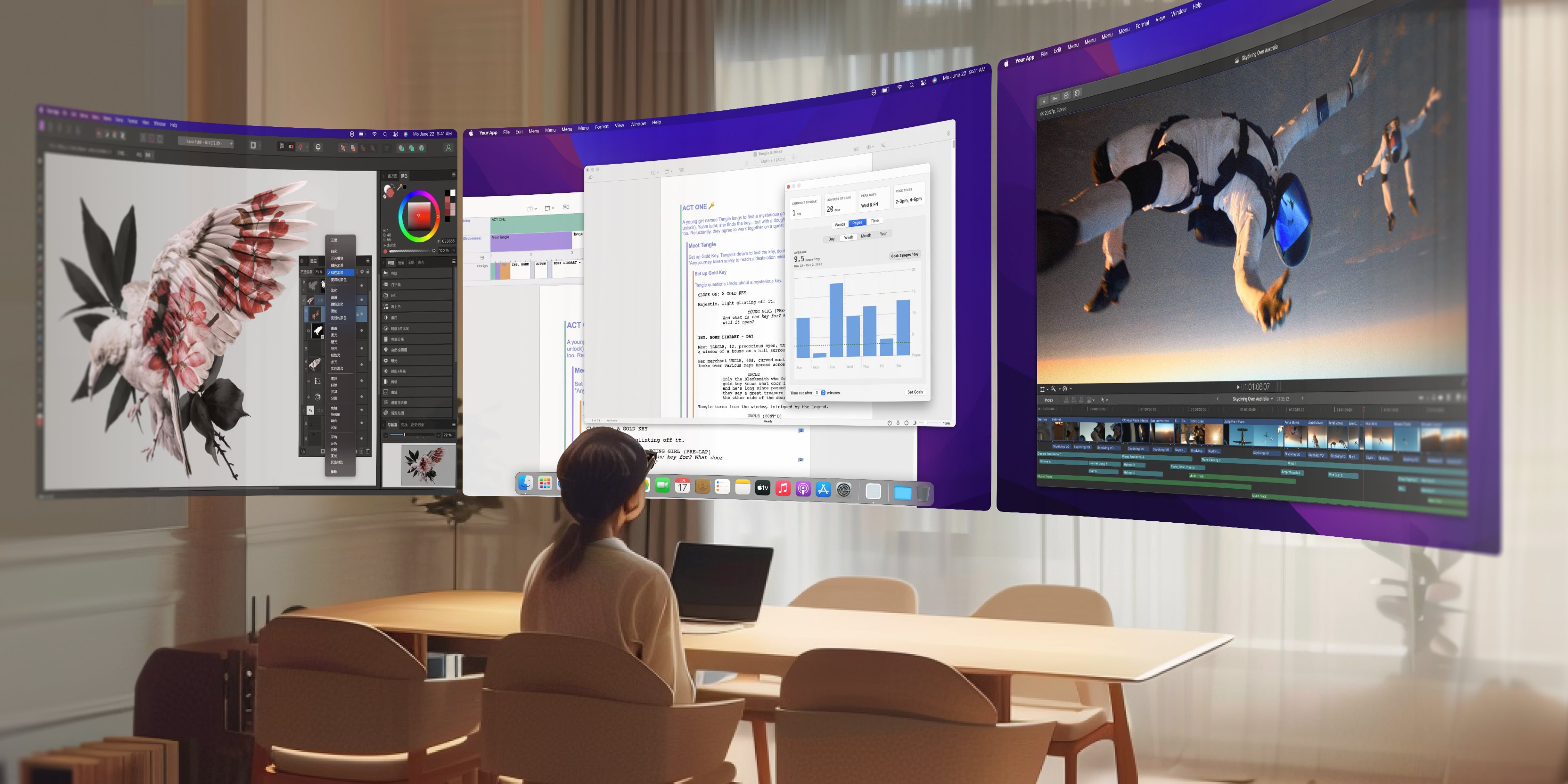
Ever feel trapped by your laptop's tiny screen? Constantly juggling tabs, switching windows during multitasking, or getting lost in a sea of overlapping apps while researching and writing? If you're a remote worker, digital nomad, or anyone craving better focus in a hybrid work setup, you're not alone.
Traditional operating systems like Windows, macOS, iOS, and Android are built around a flat, 2D world. But our brains thrive in 3D space! That's where INAIR OS, the groundbreaking spatial operating system for AR glasses, comes in – it's like giving your workflow a massive upgrade to true spatial computing.

What Is a Spatial Operating System? (Hint: It's Way More Than Just Another Desktop)
Spatial OS isn't some minor tweak to existing systems – it's a total game-changer. Instead of cramming everything onto one physical screen, INAIR OS floats apps and windows in the 3D space around you.
Picture this vibrant setup:
-
Your main document front and center
-
Reference materials hovering to your left
-
Charts and data dashboards spread out on the right
-
Chat or email tools chilling at the edge of your view
-
Even multimedia playing as ambient background
This isn't sci-fi – it's your everyday reality with INAIR AR glasses powered by INAIR OS. Perfect for productivity AR glasses users who want an immersive, multi-screen workspace on the go.

INAIR OS: Your Portable Spatial Workstation Redefining Multitasking
Forget time-slicing between apps on a single screen. INAIR OS delivers real spatial multitasking, blending mobile apps, desktop tools, and media into one always-on 3D environment.
Key breakthrough: Open up to 6 virtual windows simultaneously!
-
Resize, reposition, and adjust depth for each one
-
Easily compare content side-by-side in space
-
Critical info stays visible – no more "where did I put that tab?"
-
Workflows flow naturally, matching how your brain actually thinks
This makes INAIR OS a top contender in best AR glasses for productivity 2025, especially for remote work, virtual collaboration, and mobile office scenarios.
Smart, Intuitive Spatial Interactions That Feel Natural
INAIR OS is all about "just works" vibes:
Smart window placement:
-
First app? Pops up elegantly in the center of your view
-
Second one? Intelligently slides to the left or right based on where you're looking
-
More apps? They organically arrange around your focus
Effortless controls:
-
Move a window: Grab the bottom bar with your INAIR Pod and drag
-
Adjust distance: Swipe up/down on the Pod's touchscreen
-
Flip orientation: Tap the toolbar for portrait or landscape
-
Follow mode: Turn it on, and key windows stick with your gaze for perfect positioning
It's designed for augmented reality productivity – no steep learning curve, just intuitive fun.
INAIR Spatial Computer: Bringing Spatial OS to Life
To unlock this power, you need killer hardware – enter the INAIR Spatial Computer.
All-in-one portable kit: The INAIR travel bundle (INAIR 2 Pro glasses, INAIR Pod host, foldable keyboard, and carry case) is half the size of a typical laptop but delivers an equivalent 140-inch multi-screen workspace. It's literally a "supercomputer in your toiletry bag" for digital nomads and frequent travelers.
INAIR Pod: The Brain of Spatial Computing
-
Handles real-time rendering for multiple floating windows
-
Smart sensors anticipate your moves
-
All-day battery for mobile office marathons
-
Runs standalone or streams from your existing devices
Shift from "tied to a desk" to "workspace anywhere" – coffee shops, airports, hotels, client sites. Your AR office setup stays consistent, boosting efficiency without compromise.

Q&A: Everything You Need to Know About INAIR OS Spatial Operating System
Q1: Do I have to learn a whole new way to operate?
A: Nope! It's super intuitive – dragging, zooming, clicking feel familiar. Quick onboarding guides get most users flying in under 15 minutes.
Q2: Will my favorite apps work on INAIR OS?
A: Absolutely. Full compatibility with the massive Android app ecosystem, plus seamless remote streaming for pro software on Windows or macOS.
Q3: Does running 6 windows drain the battery fast?
A: Not at all. Optimized lightweight architecture and smart power management keep things smooth, with typical multi-tasking lasting hours on the Pod's efficient battery.
Q4: Will long sessions cause eye strain?
A: Quite the opposite! Spatial depth reduces fatigue compared to staring at a fixed-distance flat screen. Plus, INAIR glasses have eye-care certifications for comfy all-day wear.
Q5: How do I get started with INAIR OS?
A: Grab the INAIR kit – plug-and-play with guided setup. Dive into your personal 3D workspace in minutes.
Final Thoughts: The Dimensional Leap for Productivity
We've spent decades tweaking 2D efficiency, but human thinking is inherently spatial and parallel. INAIR OS isn't just an upgrade – it's a revolution in how we work with spatial computing AR glasses.
It's not about more screens; it's about smarter space. Not more features; it's natural interactions. Not beefier hardware; it's superior experience.
When your OS finally "gets" spatial thinking, you'll unlock crazy levels of creativity and output.
Space isn't a luxury – it's the future of productivity. Welcome to the next dimension with INAIR OS! 🚀
Pricing & Where to Grab It
Right now live on the official site:
→ INAIR Elite Suite
(INAIR Pod + INAIR 2 Pro AR Glasses + all accessories) – the full experience
(lighter travel bundle)
Explore inairspace.com!
Share:
The Ultimate Portable Multi-Screen Wonder for 2025: INAIR AR Glasses Unlock Infinite Virtual Workspaces
Why You Need an INAIR AI Spatial Computer: Blurring the Lines Between Work and Play Like Never Before