You find a seat at the airport, open your laptop, and try to finish an assignment before boarding.
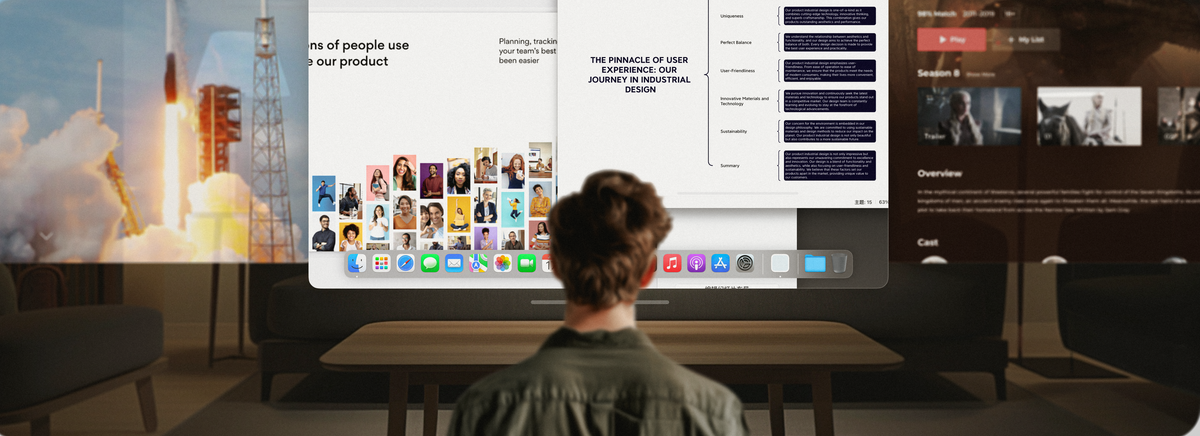
Your document fills most of the screen. The reference material sits behind it. Messages keep interrupting. There is barely enough table space for your laptop and a drink.
Your computer has the tools you need. The workspace is the problem.
For students heading back to campus, remote workers traveling between cities, and anyone balancing coursework with an internship, a useful travel work setup needs to fit the places where work actually happens.
INAIR brings a different option into your bag. With compatible AR glasses and INAIR Pod, you can build a virtual workspace that travels with you.
Here are five everyday frustrations it can help address.
Your Work Needs Several Windows, but Your Laptop Has One Screen
Writing a report often means moving between your draft, research, and assignment instructions. Preparing a presentation adds slides, notes, and messages to the mix.
You can shrink everything to fit. You can keep switching tabs. Either way, you spend time finding the information you were just looking at.
INAIR Pod supports up to six virtual windows on compatible setups, giving your applications separate places in your workspace.
For a study session, try a simple arrangement:
-
Your draft in the main window.
-
Research or reference material beside it.
-
A lecture recording or communication app in another window.
Start with the windows your task needs. The benefit is being able to keep useful material available while you work.
Already own compatible AR glasses? Pod gives you a way to build on that equipment with its own operating system and application support. Spatial features vary by glasses model and software version.
A Bigger Laptop Still Cannot Give You a Bigger Table
A café table may have room for your computer, but little else. A hotel desk may double as a place for your luggage. Packing a portable monitor only helps if you have somewhere to put it.
Virtual displays give you another way to use that limited space.
Picture arriving at a small hotel desk with a paper to finish. You unpack the keyboard, connect your glasses and Pod, and open the applications you need. You do not have to find room for an additional monitor beside the desk lamp.
The foldable keyboard works best on a stable, flat surface. You still need somewhere suitable to type, but you can leave the extra physical screens out of the setup.
Your Laptop Screen Faces Everyone Around You
Working in public can make ordinary tasks feel exposed.
You may be checking grades in an airport lounge, replying to an internship email in a café, or reviewing a presentation beside another passenger. An open laptop display puts that content on a screen facing the surrounding space.
With INAIR glasses, your work appears in a personal display in front of your eyes. That gives you a more private viewing arrangement for shared environments.
For a travel work setup, this can be especially useful when you want to review material without placing it on a large outward-facing screen.
INAIR Pod turns compatible AR glasses into a personal workspace, letting you read, write, and enjoy entertainment through apps running directly on Pod—without opening a laptop in a shared space.
Screen privacy is one part of the experience. Account security, network protection, and any information displayed on a connected computer still need their own attention.
Your Laptop Screen Cannot Bring Your Home Computer With You
Sometimes the problem is what sits behind the screen.
Your main computer may have the desktop software, files, or project environment you need. You want to check something while away, but moving the entire setup is impractical.
Imagine continuing a project during a visit home or checking your desktop workspace from a hotel. The computer handles the desktop application while you access it through your portable setup.
For supported remote wake-up configurations,
Go Pack also includes the
INAIR Wakey accessory.
Set up and test remote access before you leave. Your computer must be available, and streaming depends on network conditions and access permissions. Required desktop software continues to run on the remote computer.
For the right workflow, this gives you a practical reason to carry a compact spatial setup: access to your familiar tools without transporting your entire desk.
Adding More Screens Can Turn Into Packing More Equipment
A second monitor solves one problem at home. On a trip, it adds another item to carry, protect, connect, and position.
Then there is downtime. You finish your work and want to watch something, but you are back to the same laptop screen—or considering another device for entertainment.
INAIR lets the same setup serve both parts of the day.
Use your virtual workspace for supported tasks, then switch to a movie or video when you finish. Pod also offers real-time AI
2D-to-3D conversion for supported content and display configurations, adding another way to enjoy what you watch.
For someone preparing for a semester away, a research trip, or regular travel between campus and home, this is a useful packing question:
Which combination will you use throughout the day?
Choose Your INAIR Travel Work Setup
Your starting point should be the equipment you own and the work you expect to do.
Building a Setup From the Beginning? Explore Go Pack
Choose the
INAIR Go Pack if you want INAIR glasses, Pod, a foldable keyboard, and travel accessories in one bundle.
It is a straightforward place to start when preparing your equipment for a new semester or a more mobile work routine.
Need a Different Combination? Customize Your Workspace
Before ordering, list your essential applications and check how you will access each one. That small step helps you choose equipment around your actual coursework and work requirements.
Make Room for Your Work Wherever You Set Up
A crowded table, one overloaded screen, and an exposed display can make a short work session unnecessarily awkward.
INAIR gives you a way to carry a personal virtual workspace between the places where you study, work, and unwind.
As you prepare for the new semester, think about the assignment you will write away from campus, the project you will check during a trip, and the downtime afterward. Build a setup that earns its place in your bag.