


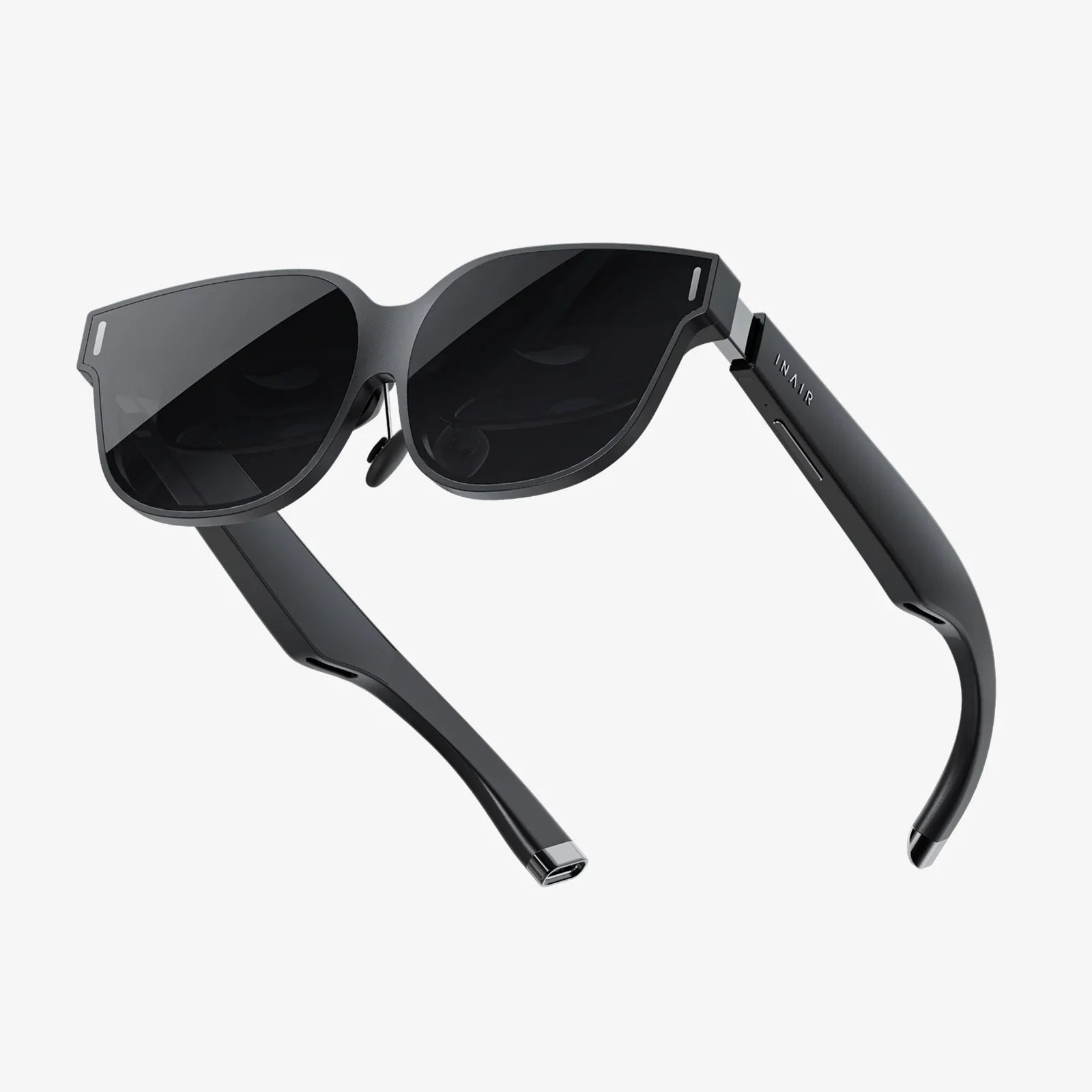
If you have been hearing about Rayneo Air 3s and wondering whether this new wave of lightweight AR-style glasses is actually worth your money, you are not alone. Wearable displays are suddenly everywhere, promising theater-size screens, private viewing, and next-level productivity in a form factor that looks almost like everyday eyewear. But separating hype from real-world value is not easy, especially when every spec sheet looks impressive on paper. This guide walks you through what matters most about Rayneo Air 3s type glasses, how they fit into your daily life, and what to look for before you click that buy button.
At their core, Rayneo Air 3s style devices are designed to give you a large, virtual screen that floats in front of your eyes while still remaining compact and relatively discreet. They are not full mixed reality headsets with complex spatial mapping and gesture tracking. Instead, they sit in the sweet spot between traditional monitors and bulky VR gear: a wearable display that follows you everywhere, powered by your phone, laptop, handheld console, or other compatible device. To understand whether that is appealing for you, it helps to break down the experience into display quality, comfort, connectivity, and practical use cases.
What Rayneo Air 3s Style Glasses Actually Are
Rayneo Air 3s type glasses fall into the category often called AR glasses, smart glasses, or wearable displays, but a more accurate description is personal cinema or monitor glasses. They look like slightly thicker sunglasses, but inside the frame, micro-displays and optical elements project an image that appears as a large screen at a comfortable viewing distance. The result is a virtual display that can feel like sitting in front of a big TV or monitor, without actually needing any physical screen in front of you.
Unlike full-featured standalone headsets, Rayneo Air 3s style devices generally rely on an external source for content and processing. That means you plug them into a phone, laptop, gaming handheld, or similar device using a wired connection, most commonly USB-C. The device sends video and sometimes power to the glasses, which then present the visual output directly in front of your eyes. Your external device still runs the apps, games, or videos; the glasses simply give you a bigger and more immersive viewing experience.
This approach brings several advantages: lower weight, simpler design, and fewer distractions from complicated menus and controllers. It also means your existing apps and games work almost immediately, as long as your device supports video output over the chosen connection.
Display Quality And Visual Experience
The main reason to consider Rayneo Air 3s style glasses is the visual experience. If the display does not impress, the product fails its core mission. Several factors determine how satisfying the visual quality will be: resolution, brightness, color accuracy, field of view, and clarity across the entire image.
Resolution And Sharpness
Most modern wearable displays in this category aim to deliver at least high-definition resolution per eye, sometimes higher. With Rayneo Air 3s type devices, the goal is to create an image that looks crisp enough for watching movies, reading text, and playing games without noticeable pixelation at normal viewing distances. Because the virtual screen appears relatively large, resolution matters more than on a small phone screen. You want text in documents or browser windows to look clean, not fuzzy or jagged.
When evaluating resolution, do not focus only on the raw numbers. Consider how that resolution translates into effective sharpness across the field of view. Some glasses may list a high resolution but still look soft due to optical limitations. Reviews and user feedback that specifically mention reading comfort, spreadsheet work, or coding are especially useful indicators of real-world sharpness.
Brightness And Contrast
Brightness is crucial for visibility in brighter environments, such as offices with overhead lighting or daytime travel. If the display is too dim, you will struggle to see details and colors will look washed out. Rayneo Air 3s style glasses aim to balance brightness with power consumption and comfort. Excessive brightness can cause eye fatigue, while insufficient brightness makes the experience frustrating.
Contrast ratio also plays a major role. High contrast helps dark scenes in movies stay rich and deep instead of turning into gray mush. It also improves readability of white text on dark backgrounds, which is common in many productivity tools and code editors. When considering glasses in this category, pay attention to comments about black levels and night scenes, as these reveal how well the display handles contrast.
Color Reproduction
For many users, color accuracy is a secondary concern compared to sharpness and brightness, but it still matters. Rayneo Air 3s style glasses are used for movies, games, and sometimes creative work. You want colors to look natural and vibrant without being oversaturated or tinted. Subtle skin tones, gradients in skies, and deep reds or greens in games can quickly reveal color weaknesses.
If you work with photography, video editing, or digital art, you will likely still rely on a calibrated monitor for final color-critical work. However, having reasonably accurate colors on your wearable display makes it much more enjoyable for general media consumption and casual editing.
Field Of View And Screen Size Illusion
One of the most appealing promises of Rayneo Air 3s style glasses is the illusion of a giant screen floating in front of you. The field of view, often measured in degrees, determines how large that virtual screen feels. A larger field of view usually means a more immersive experience, but it also needs to be balanced with clarity across the entire image.
Manufacturers often describe the virtual display as equivalent to a certain screen size at a given distance, such as a 120-inch screen at several meters away. These numbers are estimates, but they give you a rough idea of how cinematic the experience feels. For movies and games, a larger virtual screen can be thrilling, while for productivity, you may prefer a slightly more moderate size that keeps everything within easy focus.
Comfort, Fit, And Long-Term Wearability
Visual quality alone is not enough. If Rayneo Air 3s style glasses are uncomfortable, heavy, or difficult to wear with your prescription lenses, you will not use them as much as you hoped. Comfort is one of the most important and underappreciated aspects of this category.
Weight And Balance
Because these glasses pack screens, optics, and electronics into a small frame, weight distribution is critical. Even a relatively light pair can feel uncomfortable if most of the weight presses on the bridge of your nose. Rayneo Air 3s type designs try to distribute weight along the frame and temples, reducing pressure points and making longer sessions possible.
When reading impressions from existing users, look for comments about nose fatigue, temple pressure, and how the glasses feel after one or two hours of use. A product that feels fine for ten minutes but becomes painful after an hour will not fit well into daily life.
Nose Pads And Adjustability
Adjustable nose pads are essential for achieving a good fit and proper alignment with the displays. Rayneo Air 3s style glasses typically include multiple nose pad options or adjustable components to accommodate different face shapes. A secure but comfortable fit ensures that the image stays centered and clear, reducing eye strain.
If you have a smaller or larger nose bridge than average, or if you wear glasses for long periods already, pay attention to how adjustable the nose pads are. The right configuration can dramatically improve comfort and visual clarity.
Using With Prescription Lenses
Many potential buyers already wear prescription glasses. For them, compatibility is a decisive factor. Some Rayneo Air 3s style glasses are designed to be worn over thin prescription frames, while others support clip-in prescription inserts or custom lens adapters.
Each approach has trade-offs. Wearing them over your existing glasses can be convenient but may feel bulky and less stable. Clip-in inserts provide a cleaner fit but may require additional purchase and proper lens ordering. Before you commit, verify what prescription options are available and how they affect comfort, field of view, and image clarity.
Connectivity And Device Compatibility
Since Rayneo Air 3s style glasses rely on external devices for content, connectivity is at the heart of the experience. You need to know which phones, laptops, consoles, and other gadgets can drive the glasses without complicated workarounds.
USB-C Video Output
The most common connection method for modern wearable displays is USB-C with DisplayPort over USB-C. Many recent laptops and some smartphones support this feature, allowing the glasses to function like an external monitor. If your phone or laptop supports video output over USB-C, you can often plug in and see an image immediately.
However, not all USB-C ports are equal. Some only handle data and power, without video. Before assuming compatibility, check whether your device explicitly supports DisplayPort over USB-C or mentions external display support. This step can save you from frustration later.
Adapters And Alternate Connections
For devices that lack native USB-C video output, adapters may bridge the gap. Certain game consoles, older laptops, or media players can connect through HDMI adapters designed for wearable displays. The quality of these adapters varies, so it is wise to research reliable options that preserve resolution and refresh rate.
Some Rayneo Air 3s style ecosystems also provide optional hubs or docks that expand connectivity, adding support for more input sources or enabling power pass-through, so your phone charges while driving the glasses. If you expect to use the glasses with multiple device types, planning your adapter setup is part of the buying decision.
Power And Battery Considerations
Most Rayneo Air 3s type glasses draw power from the connected device, which simplifies the design by avoiding a large internal battery. This approach keeps weight low but shifts the power burden to your phone or laptop. Extended use can drain your phone battery faster, especially during high-brightness video playback or gaming.
To mitigate this, some users pair the glasses with a power-delivery hub or external battery, allowing long sessions without worrying about battery life. When planning how you will use the glasses, consider whether your main device has enough battery capacity for your typical sessions and whether you are comfortable carrying a small hub or power bank when needed.
Use Cases: How Rayneo Air 3s Style Glasses Fit Into Daily Life
The real value of Rayneo Air 3s style glasses emerges when you map them onto specific use cases. While the technology is impressive, what matters most is whether it actually improves your daily activities.
Portable Movie Theater
One of the clearest applications is turning any seat into a personal cinema. Whether you are on a long flight, riding a train, or relaxing at home, the glasses can display a large screen without disturbing people around you. You get a cinematic experience with minimal physical space, and you do not need to fight over the living room TV.
This is especially appealing for frequent travelers. Instead of staring at a small phone screen or relying on airline entertainment systems, you can watch your own shows, movies, or downloaded content on a huge virtual display. With a comfortable fit and good brightness, you can watch entire films without feeling like you are squinting at a tiny screen.
Immersive Gaming
For gamers, Rayneo Air 3s style glasses offer a way to enjoy a big-screen experience without a dedicated TV or monitor. Paired with a handheld console, gaming laptop, or cloud gaming service on a phone, the glasses create a sense of being fully surrounded by the game world, even in a small room or shared space.
Low latency is crucial here. Because the glasses function as an external display, the responsiveness mostly depends on the connected device and the quality of the connection, rather than the glasses themselves. Still, the perception of input lag can be influenced by how quickly the display updates and how stable the image is. When evaluating gaming performance, pay attention to user reports about fast-paced games, shooters, or racing titles, where lag is most noticeable.
Work And Productivity
Beyond entertainment, Rayneo Air 3s style glasses can act as a portable monitor for work. Imagine opening your laptop in a small hotel room or coffee shop and instantly having a large virtual screen for spreadsheets, presentations, or research. In some setups, you can even create virtual multi-monitor layouts by combining the glasses with your laptop screen.
This flexibility is particularly valuable for digital nomads, remote workers, and professionals who travel frequently. Instead of carrying a bulky portable monitor, you have a lightweight pair of glasses that fits into a small case. You can work on complex documents, manage email, or join video calls without feeling constrained by a tiny laptop display.
Private Viewing And Shared Spaces
Another underrated use case is private viewing in shared environments. If you live with roommates, family members, or in a small apartment, you may not always be able to blast your favorite show or game on a large TV. Rayneo Air 3s style glasses let you enjoy a big-screen experience without taking over the main display or disturbing others.
This also works in the opposite direction: other people can use the room or TV while you watch something entirely different on your glasses. The ability to carve out a personal viewing zone in a shared space is one of the subtle but powerful benefits of wearable displays.
Learning, Tutorials, And Extended Reading
Because the glasses can display large, clear text, they are useful for online courses, coding tutorials, or reading long-form content. You can follow along with a video lecture while keeping notes on your laptop, or read technical documentation without constantly zooming and scrolling.
For students or self-learners, this can make extended study sessions more comfortable. Instead of leaning over a laptop, you can sit back, maintain better posture, and let the virtual screen hover in a more ergonomic position. Over time, this can reduce neck and back strain compared to hunching over a small device.
Eye Strain, Safety, And Health Considerations
Any device that sits close to your eyes and projects images for long periods raises questions about eye strain and safety. Rayneo Air 3s style glasses are no exception, and it is important to understand how to use them responsibly.
Focus Distance And Vergence
Although the displays are physically close to your eyes, the optics make the virtual screen appear at a certain distance, often several meters away. This means your eyes focus as if looking at a distant object, which can actually reduce strain compared to staring at a screen only a few inches away.
However, extended sessions without breaks can still cause fatigue. Your eye muscles, and sometimes the muscles around your neck and head, work continuously to maintain focus and alignment. Following common guidelines like the 20-20-20 rule (every 20 minutes, look at something 20 feet away for 20 seconds) can help keep your eyes comfortable.
Blue Light And Brightness Control
Like other digital displays, Rayneo Air 3s style glasses emit blue light, which may contribute to eye strain or difficulty falling asleep if used heavily at night. Many users mitigate this by lowering brightness, enabling warm color modes on the connected device, or using blue-light-reducing settings during evening hours.
Brightness control is especially important. Running the display at maximum brightness all the time is rarely necessary and can accelerate fatigue. Adjusting brightness to match your environment, rather than overpowering it, makes for a more pleasant experience.
Motion Sickness And Adaptation
Some people are sensitive to motion in virtual environments, especially in VR headsets. Rayneo Air 3s type glasses, however, typically induce less discomfort because they function more like a stationary screen than a fully immersive headset. Your peripheral vision often remains partially aware of the real world, which can reduce disorientation.
Even so, if you are prone to motion sickness, start with shorter sessions and avoid sudden, fast-moving content until you know how your body reacts. Gradual adaptation is usually the best approach.
Comparing Rayneo Air 3s Style Glasses To Other Options
To evaluate Rayneo Air 3s type devices properly, it helps to compare them with the main alternatives: traditional monitors, portable monitors, VR headsets, and full mixed reality headsets.
Versus Traditional And Portable Monitors
Traditional monitors provide excellent image quality, large screen sizes, and comfortable ergonomics, but they are stationary. Portable monitors offer mobility but still require physical space, stands, and protective cases. Rayneo Air 3s style glasses compress that screen into a wearable form, trading physical footprint for a virtual display.
If you mostly work from a single desk and rarely travel, a high-quality monitor may still be the best choice. But if you are often on the move, share your workspace, or lack room for multiple screens, wearable glasses can deliver a similar sense of screen real estate without the bulk.
Versus VR Headsets
VR headsets create fully immersive environments, blocking out the real world and enabling 3D experiences, room-scale tracking, and advanced interactions. They are fantastic for certain games, simulations, and creative tools, but they are typically heavier, bulkier, and less convenient for casual use.
Rayneo Air 3s style glasses prioritize comfort, portability, and quick access over full immersion. You can slip them on, watch a movie, or work on a document without completely isolating yourself. For many users, that balance between presence in the real world and an enhanced virtual display is more practical day-to-day than the deep immersion of VR.
Versus Mixed Reality Headsets
Mixed reality headsets overlay digital content onto your environment with spatial awareness, hand tracking, and advanced sensors. They are powerful but often expensive and targeted more at developers, enterprises, and specialized workflows. They also tend to be heavier and more complex to set up.
Rayneo Air 3s type glasses do not attempt to replace that level of spatial computing. Instead, they focus on the simpler but highly useful task of providing a large, comfortable screen anywhere you go. If you primarily want a better way to watch content and work on documents, the simplicity of wearable display glasses may be more appealing than the complexity of full mixed reality systems.
Practical Buying Tips For Rayneo Air 3s Style Glasses
Before you commit to purchasing Rayneo Air 3s style glasses, it is worth walking through a short checklist to ensure they will fit your expectations and lifestyle.
Check Device Compatibility First
Make a list of the devices you plan to use with the glasses: your phone, laptop, gaming handheld, console, or media player. Confirm which ones support video output over USB-C or can be adapted via HDMI or other connections. If your main device cannot output video, the glasses will not be useful without additional hardware.
Pay special attention to smartphones. Many people assume any USB-C phone will work, but some models lack video-out capability. Searching for your specific model plus terms like external display or USB-C video is a quick way to verify.
Consider Your Primary Use Case
Think about how you will use the glasses most of the time. If your primary goal is watching movies during travel, prioritize comfort, brightness, and audio options. If you are focused on gaming, look for low latency, good color, and compatibility with your preferred platforms. For productivity, pay attention to text clarity, resolution, and how well the glasses work with your laptop or desktop.
Defining a main use case also helps you weigh trade-offs. For example, you might accept slightly higher weight for better brightness if you mainly watch movies in bright environments, or prioritize comfort over maximum screen size if you plan long work sessions.
Plan For Prescription Needs
If you wear prescription glasses, investigate whether you can comfortably wear them under the Rayneo Air 3s style frame or if you will need dedicated inserts. Look for user experiences from people with similar prescription strength or face shape. This step can make the difference between a device you use daily and one that sits in a drawer.
Read Real-World Feedback
Spec sheets can only tell you so much. Real-world feedback from users who have worn the glasses for hours at a time is invaluable. Look for comments about comfort, heat buildup, cable flexibility, and any quirks with specific devices or operating systems.
Pay extra attention to repeated themes. If many users mention nose fatigue after an hour, or praise the clarity of text for coding, those patterns are likely to reflect genuine strengths and weaknesses.
Future Potential Of Rayneo Air 3s Style Wearable Displays
Rayneo Air 3s type glasses represent a snapshot of a rapidly evolving category. As display technology, optics, and connectivity improve, wearable displays are likely to become thinner, lighter, and more capable. We can expect better resolution, wider fields of view, more efficient power use, and deeper integration with operating systems.
In the near future, it is easy to imagine these glasses becoming as common as wireless earbuds: a personal accessory that travels everywhere, ready to turn any moment into a private cinema, a focused workspace, or a gaming session. As more apps and platforms recognize wearable displays as first-class screens, workflows and interfaces will adapt, making the experience even smoother.
For now, Rayneo Air 3s style glasses already deliver something compelling: a way to carry a giant, high-quality screen in your bag or pocket, without the bulk and fragility of traditional displays. If you crave more screen space, travel frequently, share your living space, or simply want a more immersive way to enjoy your media, this category is worth serious consideration. Taking the time to understand how these glasses fit your devices, habits, and comfort needs can turn them from a futuristic novelty into a daily tool you will wonder how you lived without.
共有:
Computer Sunglasses For Healthier Eyes And Better Screen Time
Computer Sunglasses For Healthier Eyes And Better Screen Time