


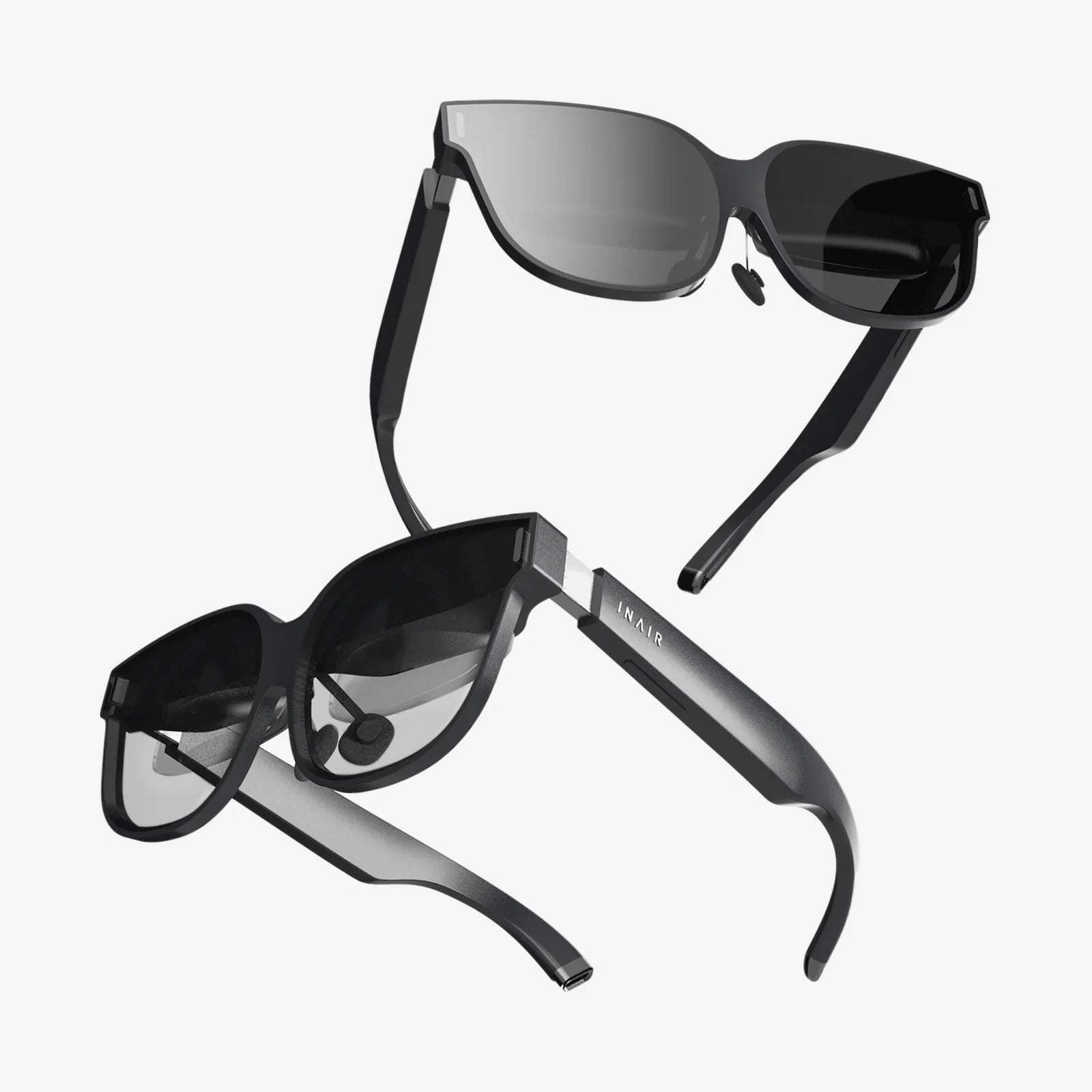
AR guidance is rapidly turning the world into an interactive instruction manual, where arrows float in front of you, steps appear at your feet, and complex tasks become as simple as following glowing cues through the air. If you have ever wished that directions, tutorials, or work procedures could literally appear in front of your eyes as you need them, you are already imagining what this technology can do. The shift from static screens to immersive overlays is not just a tech trend; it is reshaping how we learn, move, work, and make decisions in real time.
At its core, augmented reality guidance blends digital information with the physical environment, providing contextual cues that align with what you see and where you are. Instead of reading a manual or watching a video on a separate device, you receive step-by-step assistance directly on top of the real world. This change in how information is delivered has profound implications for navigation, training, maintenance, healthcare, retail, manufacturing, and beyond.
What AR Guidance Actually Is
AR guidance refers to the use of augmented reality to direct users through tasks, environments, or processes by overlaying digital instructions, markers, or visual aids onto the real world. The key is context: the system understands where you are, what you are looking at, and what you need to do next.
Unlike traditional instructions, which require you to interpret diagrams or text and then map them to the real world, AR guidance handles this mapping for you. It can highlight the exact screw to turn, the exact door to enter, or the exact cable to connect. This reduces cognitive load, errors, and time spent figuring out what a static instruction actually means.
Typical elements of AR guidance include:
- Spatial markers: Arrows, lines, and paths that appear anchored to floors, walls, or objects.
- Object highlights: Glowing outlines or color changes on equipment, tools, or components you must interact with.
- Step-by-step overlays: Text, icons, or animations that appear in sequence as you progress through a task.
- Contextual pop-ups: Additional information that appears when you look at or approach certain objects or locations.
- Interactive prompts: Instructions that respond to your actions, confirming steps or warning of mistakes in real time.
How AR Guidance Works Behind the Scenes
Although AR guidance feels magical, it relies on a combination of mature and emerging technologies working together.
Core Components of AR Guidance Systems
- Hardware: Smartphones, tablets, head-mounted displays, or smart glasses equipped with cameras, sensors, and sometimes depth sensors.
- Computer vision: Algorithms that detect surfaces, recognize objects, track movement, and anchor digital content so it appears fixed in the real world.
- Localization and mapping: Systems that understand the user’s position and orientation in space, often using simultaneous localization and mapping (SLAM) techniques.
- Interaction logic: Software that defines the workflow: which instructions appear, when they appear, and how they respond to user actions.
- Connectivity and data: Cloud or local data sources that store instructions, 3D models, and process knowledge that the AR system presents to the user.
When you use AR guidance, the device camera captures the environment, computer vision identifies surfaces and objects, and the system aligns digital overlays with those real-world elements. As you move, sensors track your position and orientation so arrows, labels, and highlights stay locked in place, giving the illusion that digital content is part of the physical world.
Key Advantages of AR Guidance
AR guidance delivers several powerful benefits across many domains. These advantages explain why organizations are investing heavily in it and why individuals find it so compelling.
1. Reduced Cognitive Load
Traditional instructions require you to interpret diagrams, memorize steps, and constantly switch attention between a manual and the task. AR guidance keeps your focus on the real world while providing just enough instruction at the right time and place. This reduces mental effort and speeds up comprehension.
2. Faster Learning and Skill Transfer
By showing rather than telling, AR guidance supports experiential learning. New employees, trainees, or students can perform tasks correctly on the first attempt by following visual cues. This accelerates onboarding and makes complex procedures accessible to less experienced users.
3. Fewer Errors and Higher Safety
Highlighting the correct components, paths, or actions reduces the likelihood of mistakes. AR guidance can also include warnings when users approach hazardous areas or attempt unsafe steps, improving overall safety in industrial, medical, or construction environments.
4. Hands-Free or Low-Hands Workflows
When delivered through head-mounted displays or smart glasses, AR guidance allows workers to keep their hands on tools and equipment while receiving instructions in their field of view. Even on handheld devices, the constant back-and-forth between screen and environment is minimized.
5. Real-Time Adaptation
Unlike printed manuals, AR guidance can adapt dynamically. If a user deviates from the expected path, the system can recalculate steps, adjust overlays, or provide corrective instructions. This makes processes more resilient to real-world variability.
AR Guidance in Navigation and Wayfinding
One of the most intuitive uses of AR guidance is navigation. Instead of following a flat map, users see directions overlaid directly onto the environment.
Outdoor Navigation
AR guidance can show floating arrows on sidewalks, highlight the correct lane on a road, or place markers at upcoming turns. This reduces confusion at complex intersections or in unfamiliar cities. Rather than translating a 2D map into 3D space, users simply follow what they see in front of them.
Potential capabilities include:
- Path overlays showing the exact route to a destination.
- Contextual markers for points of interest such as restaurants, transit stops, or landmarks.
- Dynamic rerouting displayed visually when traffic or obstacles appear.
- Accessibility-focused guidance that prioritizes ramps, elevators, and safe crossings.
Indoor Wayfinding
Indoor spaces, such as airports, hospitals, malls, and large office complexes, are notoriously difficult to navigate with traditional maps. AR guidance can overlay arrows on floors, highlight doors, and label rooms or departments as you walk.
Examples of indoor AR guidance scenarios include:
- Guiding a patient or visitor through a hospital to a specific clinic or room.
- Helping travelers find gates, baggage claim, or amenities inside large terminals.
- Directing visitors to conference rooms in multi-floor office buildings.
- Supporting facility management teams in locating equipment, utilities, or maintenance points hidden behind panels or in restricted areas.
By linking digital floor plans with real-world positioning, AR guidance turns confusing corridors into clear, visually annotated pathways.
AR Guidance in Training and Education
Training and education stand to gain enormously from AR guidance because it transforms abstract explanations into hands-on, guided practice.
Technical and Vocational Training
Fields such as automotive repair, aviation maintenance, electrical work, and mechanical assembly involve complex procedures that are often learned through lengthy apprenticeships. AR guidance can:
- Highlight the exact components to inspect or replace.
- Show animations of disassembly and reassembly steps overlaid on real equipment.
- Provide safety warnings at the exact moment and location they matter.
- Offer quizzes or checkpoints embedded within the workflow to confirm understanding.
This approach allows trainees to learn by doing, with the system acting like an expert instructor standing at their side.
STEM and Classroom Learning
In academic settings, AR guidance can help students explore scientific experiments, engineering models, or complex systems.
For example, it can:
- Guide students through laboratory procedures step by step, reducing accidents and errors.
- Overlay labels and interactive diagrams on physical models of engines, circuits, or biological specimens.
- Provide guided problem-solving paths in mathematics or physics, showing hints anchored to real-world examples.
By connecting theory with guided practice, AR guidance can deepen understanding and keep learners engaged.
AR Guidance in Maintenance and Field Service
Maintenance and field service operations are among the most promising applications for AR guidance because they often involve complex, high-stakes tasks performed in variable environments.
Equipment Maintenance and Repair
Technicians working on machinery, vehicles, or infrastructure frequently consult manuals or call experts for support. AR guidance can replace or supplement these methods by:
- Overlaying detailed instructions directly on the equipment.
- Highlighting the exact parts to inspect, remove, or replace.
- Showing torque values, measurements, and connection diagrams in context.
- Recording completed steps to create an auditable trail of maintenance actions.
This not only reduces downtime but also enables less experienced technicians to handle tasks that previously required specialists.
Remote Expert Support
AR guidance can be combined with remote collaboration. A field worker can share their view with an expert, who then places visual markers and instructions into the scene. The worker sees arrows, circles, or text instructions anchored to real objects, effectively turning a video call into an interactive guidance session.
This model:
- Reduces travel time and costs for experts.
- Improves first-time fix rates.
- Enables knowledge transfer from senior staff to a distributed workforce.
AR Guidance in Healthcare
Healthcare demands precision, safety, and clear communication, making it a natural domain for AR guidance. While adoption must account for regulatory and ethical concerns, the potential benefits are significant.
Clinical Procedures and Surgery
In clinical settings, AR guidance can assist professionals by:
- Overlaying anatomical information on a patient’s body to support procedures.
- Highlighting incision lines or injection sites based on imaging data.
- Guiding instrument placement or alignment during complex interventions.
Although such applications require rigorous validation, the principle remains the same: provide real-time, context-aware guidance that augments human expertise.
Patient Education and Home Care
Outside the operating room, AR guidance can help patients manage their own care. For example, it can:
- Show step-by-step instructions for using medical devices at home.
- Guide patients through rehabilitation exercises with visual cues.
- Help caregivers administer treatments correctly by highlighting correct dosages or procedures.
By turning complex instructions into intuitive visual steps, AR guidance can increase adherence, reduce errors, and improve outcomes.
AR Guidance in Retail and Customer Experience
Retail and customer-facing environments are using AR guidance to make experiences more intuitive, engaging, and personalized.
In-Store Navigation and Product Discovery
Large stores can be confusing, especially for new visitors. AR guidance can:
- Lead customers directly to products on their shopping list with arrows on the floor.
- Highlight promotions or recommended items as customers walk past shelves.
- Provide information overlays on products when customers point their device at them.
This reduces search time and can increase customer satisfaction by making shopping feel effortless and interactive.
Post-Purchase Setup and Support
Many products require assembly, installation, or configuration. Instead of relying on printed instructions, customers can use AR guidance to:
- See which parts connect where, with components highlighted in sequence.
- Follow animated assembly steps overlaid on the physical parts.
- Receive real-time confirmation when steps are completed correctly.
When customers can set up products quickly and correctly, satisfaction rises and support costs fall.
AR Guidance in Manufacturing and Logistics
Manufacturing and logistics operations involve repetitive, high-precision tasks that must be completed efficiently and accurately. AR guidance can streamline these workflows.
Assembly Line Support
On assembly lines, workers can use AR guidance to:
- See which part to install next and where it goes.
- Verify correct orientation and alignment using visual overlays.
- Receive alerts if a step is skipped or performed incorrectly.
This reduces training time for new workers and helps maintain consistent quality even as product variants increase.
Warehouse Picking and Inventory
In warehouses and distribution centers, AR guidance can assist workers by:
- Showing the optimal route through aisles.
- Highlighting the correct bin or shelf location.
- Confirming item selection using visual recognition or scanning.
By reducing search time and errors, AR guidance can significantly improve throughput and accuracy in logistics operations.
User Experience and Design Principles for AR Guidance
For AR guidance to be effective, it must be designed carefully. Poorly designed overlays can confuse users, cause fatigue, or even create safety risks.
Clarity and Minimalism
Overloading the user’s field of view with text, icons, and animations can be overwhelming. Effective AR guidance:
- Shows only the information needed for the current step.
- Uses simple, consistent visual cues.
- Avoids covering important parts of the real-world scene.
Contextual Relevance
Instructions should be tightly linked to what the user is doing and seeing. This means:
- Anchoring overlays to specific objects or locations.
- Triggering steps based on user actions or position.
- Adapting instructions when conditions change.
Comfort and Safety
Designers must consider ergonomics and safety:
- Ensuring overlays do not obscure hazards or critical information.
- Limiting rapid visual changes that can cause discomfort.
- Providing clear ways to pause or dismiss guidance when necessary.
Feedback and Error Handling
Users need to know when they are on the right track or when something is wrong. AR guidance should:
- Provide visual or auditory confirmation when steps are completed correctly.
- Highlight errors clearly and suggest corrective actions.
- Allow users to repeat or review steps easily.
Challenges and Limitations of AR Guidance
Despite its promise, AR guidance faces several challenges that must be addressed for widespread adoption.
Technical Constraints
Current devices may have limited battery life, processing power, or field of view. Tracking accuracy can degrade in poor lighting or visually repetitive environments. These limitations can affect the reliability and comfort of AR guidance.
Content Creation and Maintenance
Creating high-quality AR guidance content requires detailed process knowledge, 3D models, and careful design. Maintaining this content as products, procedures, or environments change can be resource-intensive.
Integration with Existing Systems
To be useful in enterprise settings, AR guidance must integrate with existing databases, workflows, and tools. This includes linking to maintenance systems, training platforms, or inventory databases. Such integration can be complex and requires careful planning.
Privacy and Security
Because AR guidance often relies on cameras and sensors, it can raise privacy concerns. Captured images or location data must be handled securely, and access to sensitive environments must be controlled. Organizations must implement robust policies and technical safeguards.
User Acceptance and Change Management
Introducing AR guidance can change how people work. Some users may be skeptical or uncomfortable with new devices. Successful adoption requires training, clear communication of benefits, and opportunities for users to provide feedback and shape how the technology is implemented.
Future Directions for AR Guidance
As hardware improves and software becomes more capable, AR guidance is likely to evolve in several important ways.
More Natural Interfaces
Future AR guidance systems will make greater use of voice commands, gesture recognition, and eye tracking. This will allow users to interact more naturally with instructions and reduce the need for manual input.
Smarter, More Adaptive Guidance
With advances in artificial intelligence, AR guidance will become more adaptive and personalized. Systems will be able to:
- Adjust the level of detail based on user experience and performance.
- Predict next steps and pre-load relevant instructions.
- Learn from user behavior to optimize workflows over time.
Persistent, Shared AR Environments
As mapping and cloud technologies mature, AR guidance will increasingly rely on persistent digital layers linked to physical spaces. Multiple users will be able to see and interact with the same guidance in real time, enabling coordinated work and shared understanding.
Broader Consumer Adoption
As devices become more affordable and user-friendly, AR guidance will likely move beyond specialized domains into everyday life. From home repairs and cooking to travel and hobbies, people will rely on AR overlays as a natural way to learn and navigate the world.
Practical Steps to Start Using AR Guidance
For organizations and individuals interested in adopting AR guidance, a thoughtful approach can maximize value and minimize risk.
Identify High-Impact Use Cases
Begin by identifying tasks or processes where:
- Errors are costly or dangerous.
- Training takes a long time.
- Instructions are complex or frequently misunderstood.
- Workers or users must often consult manuals or remote experts.
These areas are strong candidates for AR guidance pilots.
Start Small and Iterate
Rather than attempting a broad rollout, start with a focused pilot project. A limited scope allows you to:
- Evaluate technical feasibility.
- Gather user feedback.
- Refine content and workflows.
- Measure impact on performance and satisfaction.
Invest in Content Quality
The value of AR guidance depends heavily on the quality of its instructions. Invest time in:
- Documenting processes clearly.
- Creating accurate 3D models or visual assets where needed.
- Testing overlays in real environments and adjusting alignment.
Plan for Integration and Scalability
Consider how AR guidance will connect with existing systems and how it can scale beyond the pilot. Think about:
- Data flows between AR applications and other platforms.
- Device management and support.
- Content governance and version control.
Focus on User Experience
Engage end users early, involve them in design decisions, and adapt the solution based on their feedback. A technically impressive system that frustrates users will not succeed; a simple, intuitive experience can drive strong adoption.
Why AR Guidance Matters Now
AR guidance is arriving at a moment when many industries face skill gaps, complex processes, and pressure to operate more efficiently. At the same time, people are increasingly comfortable with digital overlays in their daily lives, from navigation apps to interactive media. The combination of technological readiness and practical need makes this a pivotal time for AR guidance.
By turning the world into an interactive layer of instructions and insights, AR guidance promises to make expertise more accessible, reduce errors, and help people tackle tasks they might otherwise avoid. Whether you are navigating a confusing building, learning a new skill, maintaining critical equipment, or simply trying to assemble something at home without frustration, the ability to see exactly what to do, when to do it, and where to do it can be transformative. Exploring AR guidance today means stepping into a future where the boundary between knowledge and action is thinner than ever, and where the physical world itself becomes your most intuitive interface.
Share:
AR office transformations reshaping how we work every day
AR voice: How Augmented Reality Audio Is Transforming Everyday Life