


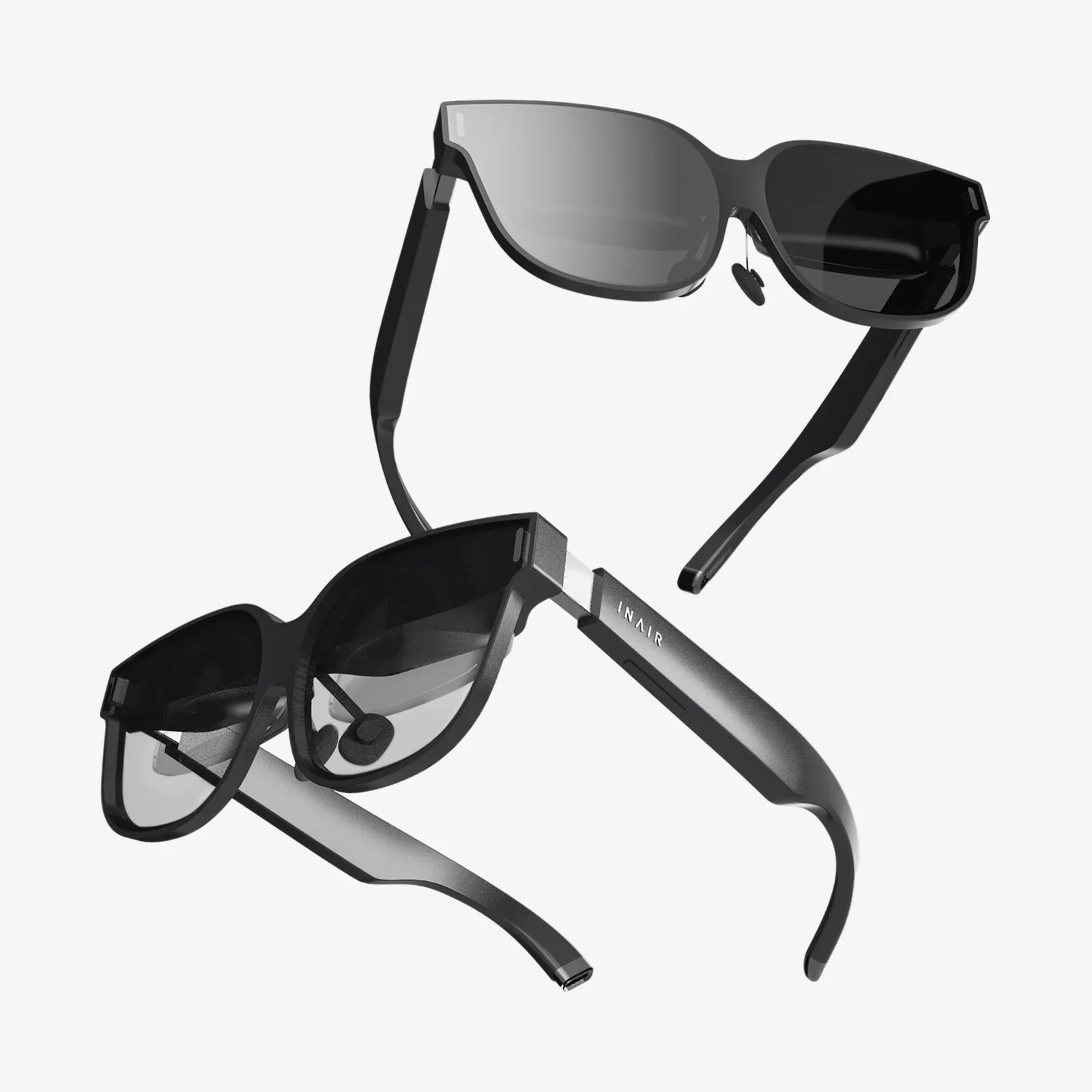
Imagine walking through a city where every building, sign, and product can come alive with digital information layered perfectly over your real-world view. That is the promise of the modern ar display: turning everyday surroundings into an interactive canvas for information, entertainment, and work. Whether you are curious about the tech behind smart glasses, heads-up dashboards, or next-generation retail experiences, understanding how ar display systems operate will put you ahead of the curve as this technology rapidly moves from novelty to necessity.
Augmented reality displays are no longer confined to science fiction or experimental labs. They are quietly reshaping industries, from training and healthcare to navigation and gaming. Yet many people still see AR as a vague buzzword rather than a concrete set of technologies with specific strengths, limits, and design challenges. This article breaks down how an ar display works, the main types you will encounter, the hardware and software building blocks, practical use cases, and where the field is headed next.
What Is an AR Display?
An ar display is a visual interface that overlays digital content on a user’s view of the real world in real time. Unlike virtual reality, which replaces the physical environment entirely, AR keeps the real world visible and enhances it with graphics, text, and interactive elements.
The core idea is simple: you see the world, plus extra information that appears anchored to objects, surfaces, or locations. However, the technology needed to make this feel natural is complex. A well-designed ar display must:
- Blend digital imagery with the real world at the correct position and scale
- Update smoothly as you move your head, eyes, or body
- Remain bright and readable in different lighting conditions
- Stay comfortable to view for extended periods
To do this, AR systems combine optics, sensors, processing power, and sophisticated software. The display is the visible tip of a deep technical iceberg.
Key Types of AR Displays
Not all AR displays look or feel the same. Different use cases demand different form factors and optical approaches. The main categories include:
1. Handheld AR Displays
Handheld AR is the most familiar form for many people. A handheld ar display typically uses a smartphone or tablet screen as a window into augmented content. The device’s camera captures the real scene, and the screen shows a live video feed with digital overlays.
This approach is accessible and inexpensive because it uses devices people already own. However, it has limitations:
- You must hold the device up, which can be tiring.
- The field of view is limited to the screen size.
- The experience feels less natural than see-through optics.
2. Head-Mounted AR Displays
Head-mounted AR displays are wearable devices that place the augmented imagery directly in front of the user’s eyes. These include smart glasses, headsets, and industrial visors. They can be see-through (optical) or video-based.
Advantages include:
- Hands-free operation, crucial in work and training environments
- More immersive and natural experience
- Potential for wider field of view than handheld devices
Challenges include comfort, weight, style, battery life, and ensuring the optics work well for different users.
3. Heads-Up Displays (HUDs)
Heads-up displays are a specialized form of ar display often used in vehicles, aircraft, and helmets. They project information into the driver or pilot’s line of sight so that eyes can stay on the environment while still receiving critical data.
Typical HUD features:
- Speed, navigation arrows, and warnings projected onto windshields
- Minimal graphics designed to reduce distraction
- Carefully calibrated brightness for varying ambient light
4. Spatial and Projection-Based AR Displays
Spatial AR uses projectors and sometimes depth sensors to cast images directly onto physical surfaces rather than into a headset or handheld device. The environment itself becomes the display.
Examples include:
- Projecting interactive instructions on a workbench
- Transforming walls or tables into dynamic information surfaces
- Creating immersive room-scale experiences without wearables
This form of ar display can be highly collaborative, since multiple people see the same augmented content without wearing devices.
Core Components of an AR Display System
Regardless of form factor, most AR display systems share a common set of components. Understanding these building blocks clarifies why certain devices look and perform the way they do.
1. Optics
The optics determine how digital images are delivered to your eyes and how they mix with the real world. Common approaches include:
- Optical see-through: Transparent lenses or waveguides let you see the real world directly while injecting digital light into your field of view. This preserves natural vision but demands precise alignment and high brightness.
- Video see-through: Cameras capture the real world and display it on screens in front of your eyes with digital overlays added. This allows more control over the image but can introduce latency and reduce realism.
- Combiner optics: Semi-reflective mirrors or combiners overlay digital content onto real-world light, often used in HUDs.
2. Display Panel
The display panel generates the digital imagery. Several technologies are used, each with trade-offs:
- Micro-OLED and OLED: High contrast and deep blacks, suitable for compact optics and high-quality visuals.
- Micro-LED: Very bright and energy efficient, promising for outdoor AR but still emerging in mass-market devices.
- LCOS and other microdisplays: Mature, small, and relatively efficient; often used in waveguide-based smart glasses.
The quality of an ar display depends heavily on resolution, brightness, color accuracy, and the ability to remain visible in sunlight.
3. Sensors
Sensors allow the system to understand your position, movement, and environment. Typical sensors include:
- IMU (Inertial Measurement Unit): Tracks head and device motion using accelerometers and gyroscopes.
- Cameras: Capture the environment for tracking, mapping, and image recognition.
- Depth sensors: Measure distance to surfaces, enabling realistic occlusion and interaction.
- Eye trackers: Monitor where you are looking to optimize rendering and enable gaze-based interaction.
4. Processing Hardware
An ar display needs significant computing power to:
- Process sensor data in real time
- Track the environment and user position
- Render 3D graphics at high frame rates
- Handle networking and application logic
This processing can be done on-device, on a connected phone or computer, or in the cloud. Each approach affects latency, battery life, and mobility.
5. Software and Algorithms
Software is the invisible engine behind every ar display. Key capabilities include:
- SLAM (Simultaneous Localization and Mapping): Builds a map of the environment while tracking the device’s position within it.
- Computer vision: Recognizes surfaces, objects, and images for anchoring content.
- Rendering engine: Draws 3D graphics that match the real-world perspective and lighting.
- User interface frameworks: Provide controls, menus, and interaction patterns optimized for AR.
How AR Displays Align Digital and Real Worlds
The magic of an effective ar display lies in alignment: digital content must appear exactly where it should in the real world. This requires precise tracking and calibration.
Environmental Tracking
Most modern AR systems use a combination of visual tracking and inertial sensors to understand the environment. Cameras detect features like edges, corners, and textures, while depth sensors measure distances. The system then creates a 3D map of the surroundings.
As you move, the ar display updates the position of virtual objects so they remain anchored to real-world locations. If a virtual label is attached to a door, it should stay on that door even as you walk around it.
Head and Eye Tracking
Head tracking ensures that the virtual world shifts correctly as you move your head, maintaining the illusion of stability. Eye tracking takes this further by knowing exactly where you are looking. This enables:
- Sharper rendering in the area you focus on (foveated rendering)
- Gaze-based selection of interface elements
- More natural interaction without constant hand gestures
Calibration and Comfort
For an ar display to feel comfortable, it must account for individual differences in eye spacing, vision, and head shape. Poor calibration can cause:
- Eye strain and headaches
- Misaligned graphics that break immersion
- Difficulty reading text or focusing on virtual objects
Designers must balance realism with comfort, sometimes simplifying graphics or limiting depth effects to avoid visual fatigue.
Visual Quality: What Makes an AR Display Look Good?
Users quickly notice when an ar display looks “off.” Several visual factors determine perceived quality:
Field of View (FOV)
Field of view is the extent of the visible augmented area. A narrow FOV can make digital objects feel like they are confined to a small rectangular window. A wider FOV allows more natural immersion but is harder to achieve with compact optics.
Resolution and Pixel Density
Text, fine details, and distant objects depend on high resolution. Inadequate pixel density can make AR content appear grainy or difficult to read, especially for information-heavy applications like manuals or dashboards.
Brightness and Contrast
Because AR often operates in bright environments, especially outdoors, the display must be bright enough to stand out against ambient light. High contrast helps digital elements remain legible against complex backgrounds.
Color Accuracy and Transparency
Accurate color reproduction ensures that digital content blends more naturally with the real world. Transparency levels must be carefully tuned so that virtual objects are visible without completely blocking the physical environment.
Latency and Motion Smoothness
High latency or low frame rates can cause virtual objects to lag behind real-world movement, breaking immersion and potentially causing discomfort. A well-engineered ar display minimizes latency so that digital content appears locked in place as you move.
Interaction Methods in AR Displays
Seeing digital content is only half the story. The real power of an ar display emerges when users can interact with virtual objects as naturally as with physical ones. Common interaction methods include:
Gesture Controls
Hand and finger tracking allow users to pinch, grab, or tap virtual elements in mid-air. This can feel intuitive but requires precise tracking and can be tiring if overused. Designers must choose gestures that are ergonomic and easy to learn.
Voice Commands
Voice input is valuable when hands are occupied or when the user needs to access functions quickly. Natural language interfaces can make AR more accessible, though noise and privacy considerations must be addressed.
Gaze and Eye-Based Interaction
Gaze-based selection uses where you look as a pointer, often combined with a confirmation gesture or voice command. This reduces the need for large arm movements and can be faster than pointing with a hand.
Physical Controllers and Wearables
In some scenarios, handheld controllers, rings, or wristbands provide precise input and haptic feedback. While less “magical” than mid-air gestures, they can deliver accuracy and reliability for professional applications.
Real-World Applications of AR Displays
Beyond the novelty factor, ar display technologies are delivering practical value in multiple sectors. Here are some of the most impactful areas today.
1. Industrial and Manufacturing
In factories and maintenance environments, workers wearing head-mounted ar displays can see step-by-step instructions overlaid directly on equipment. Benefits include:
- Reduced training time for complex tasks
- Lower error rates during assembly and repair
- Remote assistance, where experts see what the worker sees and guide them
2. Healthcare and Surgery
Surgeons and medical staff can use an ar display to view patient data, imaging, and guidance without looking away from the operative field. Potential advantages are:
- Enhanced precision in minimally invasive procedures
- Better situational awareness in emergency care
- Training scenarios that overlay anatomy and instructions on mannequins or real patients
3. Education and Training
AR transforms learning by placing interactive 3D content into the real world. Examples include:
- Visualizing complex scientific concepts as manipulable models
- Historical reconstructions layered over real locations
- Skill practice with guided overlays and instant feedback
4. Retail and Commerce
Retailers use ar display experiences to help customers visualize products in their own environment or receive contextual information in-store. Applications include:
- Trying virtual furniture in a real room through handheld AR
- Seeing additional details or reviews when viewing a product on a shelf
- Guided store navigation with personalized recommendations
5. Navigation and Tourism
AR navigation overlays directions, points of interest, and contextual data onto the real environment. Tourists can point a device at a landmark and see historical facts or translations. Drivers benefit from HUDs that keep their eyes on the road while still receiving guidance.
6. Entertainment and Gaming
Interactive games that blend digital characters with physical surroundings are one of the most visible uses of ar display technology. Live events, theme parks, and museums also use AR to create immersive storytelling experiences.
Design Challenges and Limitations
Despite impressive progress, AR displays face several technical and human-centered challenges that designers and engineers must address.
Comfort and Wearability
Head-mounted ar displays must balance performance with weight, heat, and ergonomics. Heavy or unbalanced devices can cause neck strain and discourage long-term use. Materials, form factor, and strap design all play critical roles.
Battery Life
Rendering 3D graphics, powering bright displays, and running multiple sensors consumes significant energy. Extending battery life without making devices bulky remains a central challenge.
Privacy and Social Acceptance
AR devices often include cameras and microphones. This raises concerns about recording in public, data collection, and surveillance. Social norms around wearing visible AR glasses are still evolving, and designers must consider how devices signal when they are recording.
Visual Fatigue and Health
Extended use of an ar display can cause eye strain, especially if the optics do not match the natural focus of the eyes. Designers must manage depth cues, brightness, and motion to reduce discomfort.
Content Quality and Relevance
Even the most advanced hardware is only as compelling as the content it displays. Poorly designed overlays, cluttered interfaces, or irrelevant information can overwhelm users and reduce value. Context-aware design is essential.
Best Practices for Designing AR Display Experiences
Creating effective AR experiences requires a blend of visual design, interaction design, and technical understanding. Some best practices include:
Prioritize Context Over Decoration
Every element shown on an ar display should serve a clear purpose in the user’s current context. Avoid adding digital clutter just because it is possible. Ask what the user needs to know or do at that moment.
Respect the Physical Environment
AR interfaces must coexist with the real world, not obscure it. Designers should:
- Use subtle overlays rather than large opaque panels
- Ensure critical real-world cues remain visible
- Adapt content placement to avoid blocking important areas
Design for Short, Focused Interactions
AR is often most effective in bursts: quick glances for information, short guidance steps, or brief interactions. Long reading sessions or complex multitasking are better suited to traditional screens.
Use Clear Anchors and Depth Cues
To make virtual objects feel grounded, use shadows, occlusion, and consistent scale. Ensure that objects appear attached to surfaces or locations in a way that matches real-world physics and perspective.
Support Multiple Input Methods
Because environments vary, AR experiences should support more than one interaction method. For example, combine gaze with voice, or gestures with a simple physical controller, giving users options when one input mode is impractical.
Future Trends in AR Display Technology
The evolution of ar display hardware and software is accelerating. Several trends are shaping the next generation of devices and experiences.
Thinner, Lighter, More Stylish Wearables
Advances in waveguides, microdisplays, and battery technology are pushing AR glasses closer to the size and shape of everyday eyewear. As devices become more comfortable and fashionable, mainstream adoption is likely to increase.
Higher Visual Fidelity
Emerging display technologies aim to deliver:
- Wider fields of view without bulky optics
- Retina-level resolution for crisp text and details
- Improved color and brightness for outdoor use
These improvements will make digital content feel increasingly indistinguishable from physical objects.
Smarter, More Context-Aware Experiences
As AR systems gain better understanding of environments and user behavior, they can deliver more relevant content with less manual input. This includes:
- Automatic recognition of tools, machines, or products
- Predictive suggestions based on location and activity
- Adaptive interfaces that change based on user expertise
Integration with Other Emerging Technologies
AR does not exist in isolation. It is increasingly integrated with:
- Artificial intelligence for object recognition and decision support
- Internet of Things devices for real-time data overlays
- 5G and beyond for low-latency cloud rendering and collaboration
Collaborative AR and Shared Spaces
Future ar display systems will support shared experiences where multiple users see and interact with the same virtual objects from their own perspectives. This opens possibilities for remote collaboration, training, and social interaction that feel more natural than video calls.
Preparing for an AR-Enhanced Future
The rise of ar display technology is not just about new gadgets; it is about a new layer of computing that sits directly on top of our physical world. For professionals, creators, and organizations, the question is no longer whether AR will matter, but how to position themselves as this layer becomes standard.
Developers can start by learning AR frameworks, experimenting with small prototypes, and focusing on real problems rather than flashy demos. Designers should study how people move through spaces and how information can support them without distraction. Businesses can explore pilot projects that use AR to improve training, maintenance, or customer engagement, measuring concrete outcomes rather than chasing hype.
For everyday users, understanding the basics of how an ar display works helps cut through marketing noise and make informed choices as new devices appear. Knowing what field of view, resolution, tracking quality, and interaction options mean in practice will guide you toward experiences that truly enhance your daily life rather than adding complexity.
The next wave of digital transformation will not live only on flat screens. It will hover over your desk as a virtual monitor, guide you through unfamiliar cities with arrows painted on the streets, annotate your tools with live instructions, and bring data to your eyes the moment you need it. By learning how ar display technologies function and where they are headed, you put yourself in the ideal position to benefit from, design for, or build the experiences that will define this augmented era.
Share:
Chinese Food Sherwood AR Guide to Flavor, Buffets, and Takeout Gems
Chinese Food Sherwood AR Guide to Flavor, Buffets, and Takeout Gems