


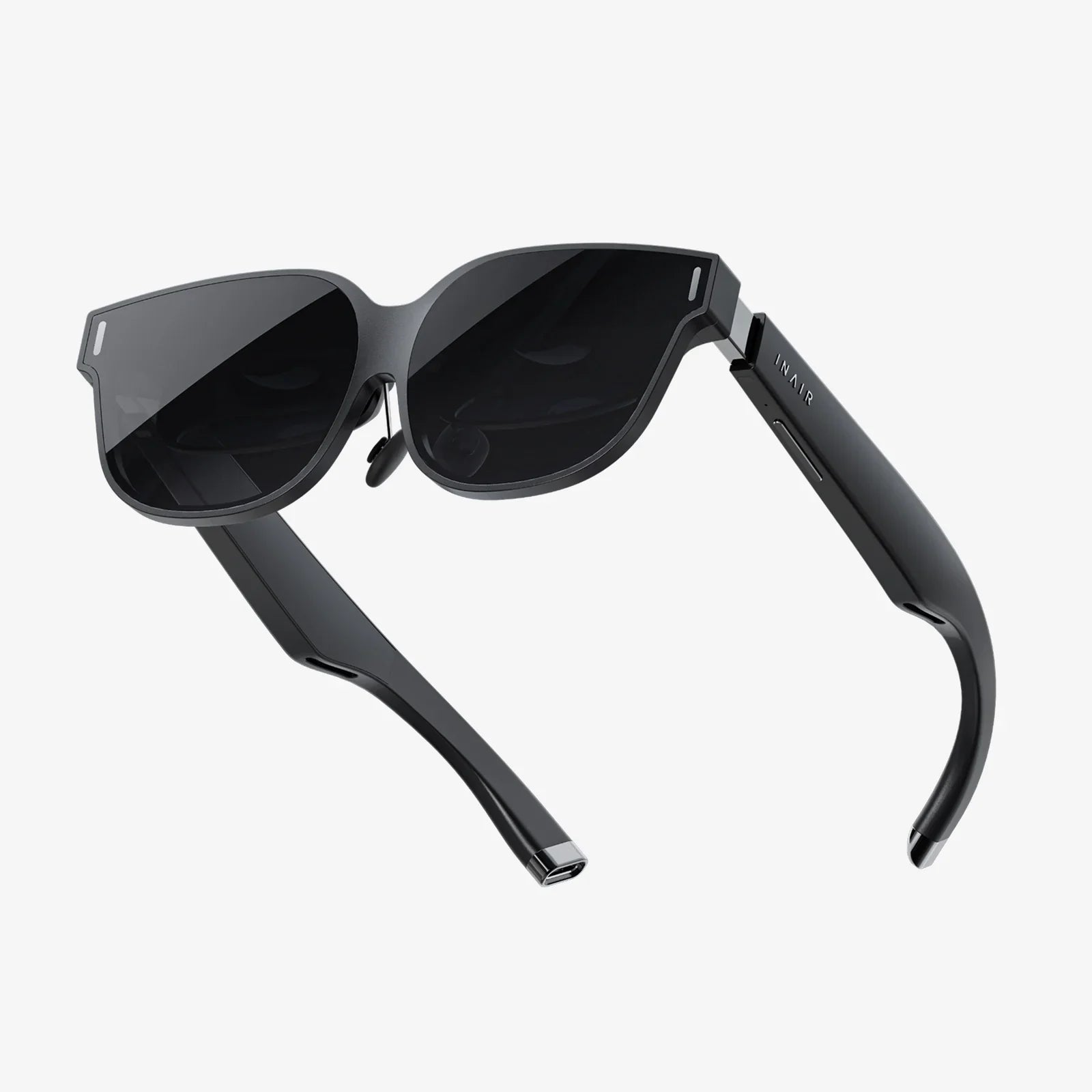
Video glasses are quietly becoming the most exciting screen you have never owned, turning commutes into cinema time, workouts into guided experiences, and even boring flights into private theaters in the sky. As these wearable displays get lighter, sharper, and smarter, they are starting to challenge tablets, laptops, and even TVs as the go-to way to watch, work, and play anywhere.
What makes video glasses so compelling is their promise of a huge, immersive display that floats in front of your eyes while keeping your hands free and your surroundings at least partly visible. Whether you are a movie lover, a gamer, a frequent traveler, or a professional looking for new ways to stay productive, understanding how these devices work and what they can realistically do for you is the first step toward deciding if they deserve a place in your everyday life.
What Are Video Glasses?
Video glasses are wearable devices that place one or more tiny displays close to your eyes and use optics to make the image appear much larger than it physically is. In practical terms, they act like a personal big-screen display that you wear like glasses or goggles. They connect to a video source such as a smartphone, laptop, handheld console, or media player and present the content directly in front of your eyes.
Most modern video glasses focus on one of two main experiences:
- Immersive cinema-style viewing with a virtual screen that can feel as large as a home theater
- Mixed reality or augmented overlays that place virtual windows and information over the real world
Unlike traditional VR headsets, many video glasses are designed to be lighter, more discreet, and easier to use in public. Some look similar to sunglasses, while others resemble compact visors. The core idea remains the same: give you a big, high-quality screen that travels with you.
How Video Glasses Work: The Technology Inside
To understand what separates good video glasses from mediocre ones, it helps to know the key technologies that power them. Several components work together to deliver a convincing visual experience.
Display Technologies
Most video glasses rely on one of these display types:
- Micro-OLED: Offers deep blacks, high contrast, and excellent color. This is ideal for movie watching and dark scenes because each pixel can turn off completely.
- Micro-LED or LED-based solutions: Often brighter, which can help in well-lit environments, but may have less perfect blacks than micro-OLED.
- LCOS or other projection-based systems: Use small projectors and reflective panels to create the image. These can be compact but sometimes show lower contrast or visible pixel structure.
The display resolution directly affects how sharp the virtual screen appears. Higher resolution reduces the "screen door" effect (visible gaps between pixels) and makes text easier to read, which is crucial if you want to use video glasses for work or web browsing.
Optics and Field of View
The optics are what transform a tiny panel into a large virtual screen. Lenses or waveguides bend and magnify the image so it appears several feet away and much larger than the physical display. Two important concepts are:
- Field of view (FOV): How wide the image appears. A larger FOV feels more immersive, like sitting close to a cinema screen.
- Virtual screen size and distance: Often described as something like "a 100-inch screen at 3 meters." Larger virtual size enhances immersion but can also amplify any blur or pixelation if resolution is low.
Well-designed optics also reduce distortion and ensure that the image remains sharp from edge to edge. Poor optics can cause eye strain, blur, or a narrow sweet spot where the image looks best.
Tracking and Sensors
Some video glasses are essentially just wearable displays, while others incorporate sensors for more advanced interactions:
- Head tracking to adjust the virtual screen as you move
- Gyroscopes and accelerometers to detect orientation
- Ambient light sensors to adjust brightness automatically
More advanced models may include cameras for mixed reality, but even basic sensor sets can improve comfort by keeping the virtual screen stable as you move your head.
Connectivity and Power
Video glasses typically connect to devices using one or more of the following:
- Wired connections such as USB-C or HDMI for low-latency, high-quality video
- Wireless streaming via Wi-Fi or similar technologies, which adds convenience but may introduce latency or compression
Power can come from internal batteries, from the connected device, or from an external power source like a portable battery pack. Battery life is a central consideration; a great display is not very useful if it only lasts for an hour.
Key Features To Look For In Video Glasses
Choosing video glasses is not just about picking the most futuristic-looking pair. Several practical features determine whether they will actually fit into your life.
Comfort and Fit
Because video glasses sit on your face, comfort is critical. Important aspects include:
- Weight: Lighter devices are easier to wear for long sessions.
- Nose pads and supports: Adjustable pads and balanced weight distribution reduce pressure points.
- Compatibility with prescription lenses: Some designs allow clip-in prescription inserts or enough room to wear regular glasses underneath.
Even the best display will feel unusable if your nose or ears hurt after 20 minutes.
Display Quality and Resolution
For an enjoyable viewing experience, look for:
- High resolution for crisp text and detailed images
- Good brightness so the image remains visible in different lighting conditions
- Wide color gamut for vibrant, accurate colors
- High contrast to maintain shadow detail and clear separation between dark and bright areas
If you plan to use the glasses for work, sharpness and text clarity matter even more than color vibrancy.
Audio Performance
Video glasses often integrate audio in one of several ways:
- Built-in speakers near the ears, which offer convenience but may leak sound
- Directional audio that aims sound toward your ears while minimizing spillover
- Standard headphone jacks or wireless audio for using your preferred headphones or earbuds
For public spaces, consider privacy and sound leakage. For travel or home use, audio fidelity and comfort may take priority.
Controls and Interface
Controlling playback and settings should not be a struggle. Common options include:
- Physical buttons on the frame or cable for volume and basic navigation
- Touch-sensitive areas that respond to swipes and taps
- Companion apps on phones or computers for deeper settings
Simple, intuitive controls matter most when you are in transit or need to adjust settings quickly without fumbling.
Compatibility With Devices
Before you commit, confirm that the video glasses work smoothly with your existing devices. Consider:
- Support for smartphones, including video output standards
- Compatibility with laptops and desktops via common ports
- Ability to connect to game consoles or handheld gaming devices
- Use with streaming devices or media players
Some video glasses require specific operating systems or hardware capabilities, so checking compatibility up front prevents frustration later.
Everyday Uses For Video Glasses
Video glasses are not just futuristic gadgets; they can serve practical roles across many areas of daily life.
Personal Cinema On The Go
One of the most appealing uses is turning any seat into a private cinema. With video glasses, you can:
- Watch movies on a virtual big screen during flights or train rides
- Stream shows without disturbing others nearby
- Enjoy late-night viewing at home without lighting up the whole room
The immersive feel comes from the combination of a large virtual screen and close proximity to your eyes, which can make even familiar content feel more engaging.
Gaming With A Giant Screen
Gamers can benefit from video glasses in several ways:
- Portable console gaming with a screen that dwarfs the built-in display
- PC or console gaming when a large TV is not available or practical
- Reduced distractions by focusing your field of view on the game
The key is low latency and sharp visuals. While video glasses are not a direct replacement for specialized VR systems, they provide a powerful alternative when you want a huge screen without a bulky headset.
Work And Productivity
For professionals, video glasses can serve as portable monitors. Potential productivity uses include:
- Extending your laptop screen while traveling
- Creating a private workspace in public environments
- Viewing documents, spreadsheets, or code on a large virtual display
Some setups allow you to arrange multiple virtual windows, enabling a multi-monitor experience without physical screens. This can be especially helpful for digital nomads, frequent travelers, or anyone who works in tight spaces.
Fitness And Guided Training
Video glasses can make workouts more engaging by:
- Displaying guided exercise routines directly in your field of view
- Overlaying metrics such as heart rate, pace, or reps
- Allowing you to follow virtual classes while keeping your hands free
Because they can be worn while moving, video glasses offer a different kind of immersion than watching a workout video on a stationary screen.
Learning And Skill Development
Education is another area where video glasses can shine:
- Interactive tutorials that guide you step-by-step through tasks
- Language learning with subtitles or prompts overlaid on surroundings
- Immersive lectures or virtual field trips that feel more engaging than a flat screen
These experiences can make complex topics easier to understand by combining visual aids, spatial context, and focused attention.
Benefits Of Using Video Glasses
Beyond the novelty factor, video glasses offer tangible advantages that explain their growing popularity.
Immersion Without A Massive TV
Getting a truly large, high-quality TV can be expensive and space-consuming. Video glasses simulate a huge screen without needing a dedicated room or wall. This is particularly appealing for people living in small apartments, shared spaces, or frequently changing locations.
Privacy And Focus
Because the image is visible only to you, video glasses provide a layer of privacy that traditional screens cannot match. This is useful when:
- Working with sensitive documents in public
- Watching content you prefer not to share with bystanders
- Trying to focus on a task without being distracted by surroundings
The immersive field of view also helps you stay engaged with the content instead of constantly glancing at your phone or other distractions.
Portability And Flexibility
Video glasses are highly portable compared with large monitors or TVs. You can:
- Pack them in a bag and carry them to work, school, or travel destinations
- Use them in places where setting up a traditional screen is impossible
- Switch between devices without rearranging physical hardware
This flexibility makes them a compelling tool for people whose lives are not tied to one desk or living room.
Potential Ergonomic Advantages
When used thoughtfully, video glasses can help with ergonomics by letting you:
- Position your head and neck more naturally instead of hunching over a laptop
- Adjust virtual screen distance and height to reduce strain
- Work in a relaxed posture without losing access to a large display
However, this depends on how you set up your workspace and how long you use the glasses at a stretch, which leads to important considerations about health.
Health, Safety, And Comfort Considerations
As with any device that places screens close to your eyes, it is important to use video glasses responsibly.
Eye Strain And Fatigue
Extended use can lead to eye strain, especially if brightness is too high or the image is not properly focused. To reduce this risk:
- Take regular breaks following guidelines like the 20-20-20 rule
- Adjust brightness to match your environment
- Ensure the glasses are properly aligned so both eyes see a clear image
If you wear prescription lenses, consider whether your vision is adequately corrected while using the glasses, either by wearing your regular glasses or using compatible inserts.
Motion And Balance
Some people may experience mild discomfort or motion-related sensations, especially if head tracking is not perfectly synchronized. To minimize issues:
- Start with short sessions to see how your body responds
- Avoid sudden, rapid head movements while viewing fast-moving content
- Use stable seating when watching for long periods
If you are prone to motion sensitivity, test video glasses carefully before relying on them for long viewing sessions.
Situational Awareness
Because video glasses can block or distract from your view of the real world, they should be used responsibly:
- Do not use them while driving or operating machinery
- Be cautious when walking in public spaces to avoid obstacles
- Use transparency modes or look around periodically if the design allows
Balancing immersion with awareness is essential, especially in crowded or unfamiliar environments.
How Video Glasses Compare To Other Devices
To decide whether video glasses are worth adopting, it helps to compare them with familiar alternatives.
Versus Traditional VR Headsets
Video glasses and VR headsets share some similarities but target different experiences:
- Video glasses focus on media consumption and portable big-screen viewing, often with a lighter, more discreet design.
- VR headsets prioritize fully immersive, interactive environments, usually with more extensive tracking and controllers.
If you want rich, interactive virtual worlds, a dedicated VR system is still the better choice. If your main goal is to watch content or work on a large virtual screen, video glasses often provide a more comfortable and socially acceptable option.
Versus Tablets And Laptops
Tablets and laptops are versatile, but they have inherent limitations:
- Screen size is limited by portability and device dimensions
- Viewing angles and glare can be problematic in public spaces
- Privacy is limited because anyone nearby can see your screen
Video glasses can offer a larger, more private display while relying on the computing power of the laptop or phone you already own. However, they are not a full replacement; you still need an input device like a keyboard or touch screen for most tasks.
Versus Large TVs And Projectors
Large TVs and projectors create communal viewing experiences and do not require wearing anything on your head. However:
- They cannot travel with you as easily as video glasses
- They require space, setup, and often more power
- They are not ideal for private viewing in shared spaces
Video glasses shine when you want a theater-like experience just for yourself, wherever you happen to be.
Future Trends Shaping Video Glasses
The current generation of video glasses is just the beginning. Several trends are likely to shape the next wave of devices.
Improved Miniaturization And Design
As components shrink and become more efficient, video glasses will continue to:
- Get lighter and more comfortable
- Look closer to everyday eyewear
- Integrate more seamlessly into daily outfits and routines
Discreet designs will make it easier to wear video glasses in public without feeling out of place.
Higher Resolution And Better Optics
Next-generation displays and lenses will aim to:
- Increase resolution for near-retina clarity
- Expand field of view for more immersive visuals
- Reduce distortions and improve edge-to-edge sharpness
These improvements will make video glasses more appealing for both entertainment and professional use, especially for tasks that require reading fine text or seeing detailed graphics.
Deeper Integration With Software And Services
As software ecosystems evolve, expect video glasses to connect more deeply with:
- Cloud-based workspaces and virtual desktops
- Streaming platforms optimized for wearable displays
- Productivity tools designed around multi-window virtual screens
This integration will make it easier to switch from watching a movie to joining a meeting to editing documents, all within the same wearable environment.
More Advanced Mixed Reality Features
While many current video glasses focus on simple screen projection, future models may expand mixed reality capabilities by:
- Overlaying contextual information onto physical objects
- Supporting gesture-based interaction and spatial controls
- Enabling collaborative shared experiences with other users
This evolution could blur the line between pure media consumption and interactive augmented reality, turning video glasses into powerful tools for both work and play.
Practical Tips Before You Buy Video Glasses
If you are considering investing in video glasses, a few practical steps can help you choose wisely.
Clarify Your Primary Use Cases
Start by deciding what you want most from the device:
- Are you mainly interested in movies and shows?
- Do you want a portable monitor for work?
- Is gaming your top priority?
- Are you exploring them for fitness or education?
Your primary use case will influence what features matter most, such as resolution, latency, or comfort during long sessions.
Check Compatibility With Your Devices
Confirm that the video glasses will work with your existing hardware and software:
- Look at supported connection standards
- Verify operating system and device compatibility
- Consider whether you need adapters or additional accessories
Ensuring compatibility ahead of time prevents unpleasant surprises after purchase.
Evaluate Comfort And Adjustability
Whenever possible, test the fit:
- Wear the glasses for at least 15 to 20 minutes to gauge comfort
- Adjust nose pads and straps to find a stable fit
- Check for pressure points or slipping
If you cannot test in person, look for detailed fit information and user feedback focused on comfort and long-term wear.
Consider Your Environment
Think about where you will use the glasses most often:
- For bright environments, prioritize brightness and contrast
- For shared spaces, focus on sound leakage and privacy
- For travel, consider portability, durability, and battery life
Matching the device to your real-world environment ensures that its strengths align with your lifestyle.
Why Video Glasses Are Worth Watching Now
Video glasses are moving from niche curiosity to serious contender in the battle for your attention. They offer a rare combination of immersion, privacy, and portability that traditional screens cannot match, all while tapping into devices and services you already use daily.
Whether you dream of turning every flight into a personal movie theater, want a portable dual-monitor setup that fits in your bag, or simply crave a more focused way to enjoy games and media, video glasses are rapidly evolving to meet those needs. Exploring them now puts you ahead of a curve that is bending toward more personal, wearable, and immersive screens—and it might just change the way you think about watching, working, and learning everywhere you go.
Share:
vr headset Guide: Everything You Need To Know Before You Buy
mr glasses Style Guide: Choosing Frames, Lenses, and Looks That Fit You