


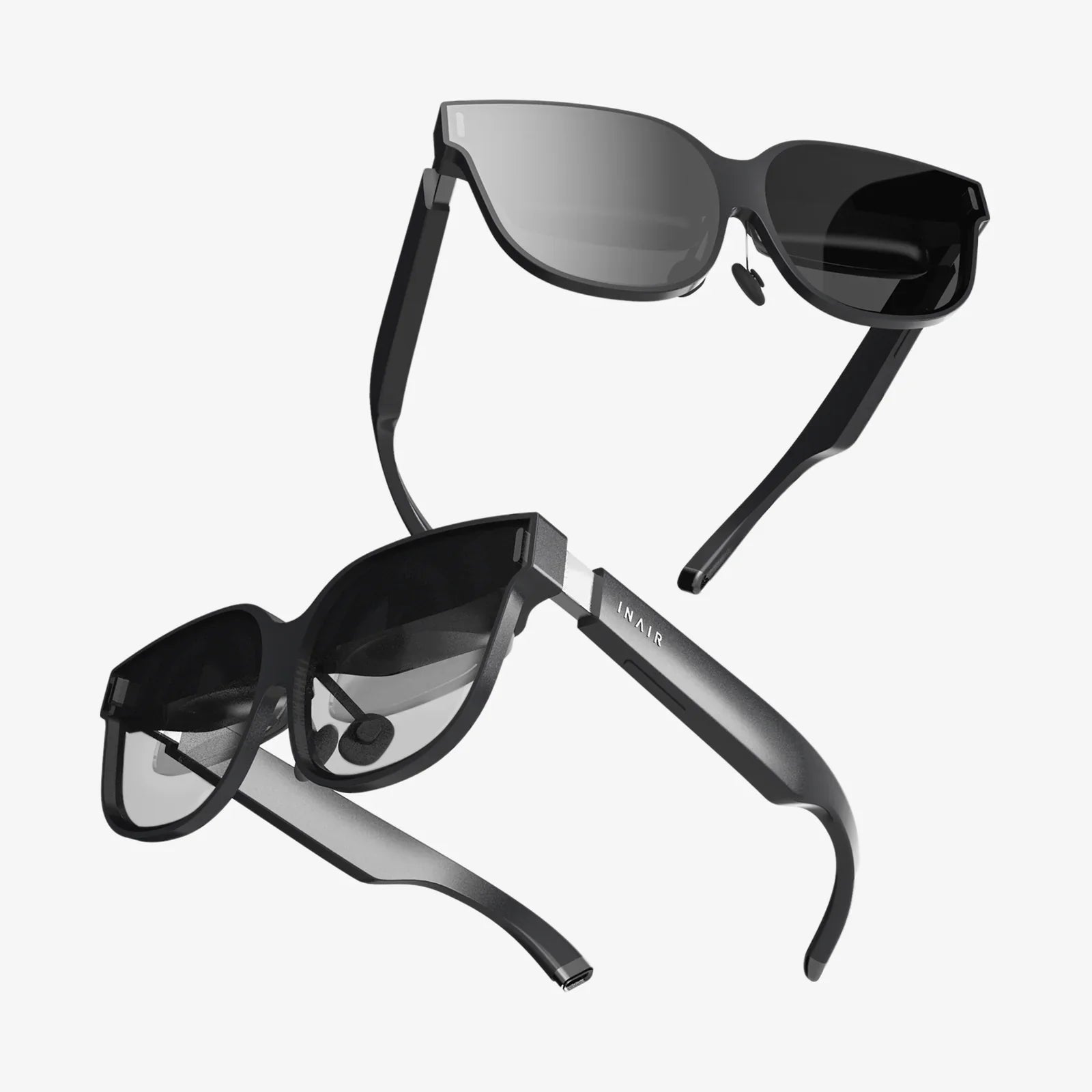
Virtual reality glasses are no longer just futuristic props from science fiction movies; they are rapidly becoming the doorway to worlds that feel as real as the one outside your window. Whether you want to step into a game, walk through a dream home before it is built, or join a meeting on the other side of the planet, these lightweight headsets are quietly rewriting what it means to see, feel, and interact with digital content. If you have ever wondered whether virtual reality is really worth your time, your money, or your attention, this guide will walk you through everything you need to know before you put a headset on and disappear into another reality.
What Are Virtual Reality Glasses?
Virtual reality glasses are wearable displays that sit on your head and cover your eyes, creating the illusion that you are inside a three-dimensional digital environment. Unlike traditional screens that you look at from a distance, these glasses place small displays close to your eyes and use lenses, sensors, and software to trick your brain into perceiving depth, distance, and presence.
When you turn your head, the virtual world moves with you. When you reach out your hands (often tracked by controllers or cameras), you can interact with objects, press buttons, or grab tools. The combination of visual immersion and motion tracking is what makes virtual reality feel so different from simply watching a video or playing a game on a monitor.
How Virtual Reality Glasses Work: The Core Technologies
Under the sleek exterior of virtual reality glasses lies a dense stack of technologies working together in real time. Understanding the basics will help you appreciate what you are paying for and why some headsets feel more convincing than others.
Displays and Resolution
At the heart of every pair of virtual reality glasses are one or two small displays, often one for each eye. These displays show slightly different images to each eye, creating a stereoscopic effect that mimics natural depth perception.
- Resolution: Higher resolution means more pixels and sharper images. Low resolution can produce a noticeable “screen door effect,” where you can see the gaps between pixels.
- Refresh rate: This is how many times per second the image updates, measured in hertz (Hz). Higher refresh rates (such as 90 Hz or more) produce smoother motion and reduce motion sickness.
- Field of view: This defines how wide your virtual vision is. A larger field of view feels more natural and immersive, while a narrow one can feel like looking through binoculars.
Lenses and Optics
Lenses sit between your eyes and the displays, bending light so that the screens, which are very close, appear to be at a comfortable distance. The quality of these lenses has a major impact on clarity and comfort.
- Lens type: Common types include Fresnel and aspheric lenses, each with trade-offs in clarity, weight, and visual artifacts like glare or “god rays.”
- Interpupillary distance (IPD) adjustment: This allows the lenses to be moved closer or farther apart to match the distance between your pupils, which improves comfort and reduces eye strain.
Tracking and Sensors
To maintain the illusion that you are inside another world, virtual reality glasses need to track the position and orientation of your head, and often your hands, with high accuracy and low delay.
- Gyroscopes and accelerometers: Measure rotation and movement of your head.
- External or inside-out tracking: Some systems use external sensors placed around the room, while others use cameras built into the headset to track your position relative to the environment.
- Hand tracking and controllers: Dedicated controllers or camera-based hand tracking let you reach out, grab, and interact with virtual objects.
Audio and Spatial Sound
Immersive sound is just as important as visuals. Virtual reality glasses often include built-in speakers or support high-quality headphones.
- Spatial audio: Simulates sound coming from specific directions in 3D space.
- Positional cues: As you turn your head, the sound field updates, helping your brain believe that virtual objects really exist around you.
Processing Power and Connectivity
Virtual reality experiences demand significant processing power to render detailed 3D worlds at high frame rates.
- Standalone headsets: These have built-in processors and storage, making them portable and easy to use.
- Tethered headsets: These connect to a computer or console via cable or wireless link, leveraging external hardware for higher performance and more complex visuals.
Types of Virtual Reality Glasses
Not all virtual reality glasses are the same. They vary in complexity, price, and intended use. Knowing the main categories will help you narrow down your choices.
Standalone Virtual Reality Glasses
Standalone devices contain all necessary components in the headset itself: processor, graphics, storage, battery, and tracking. You do not need a separate computer, console, or smartphone.
These glasses are ideal if you want a simple, portable solution that you can put on and use anywhere. They are popular for casual gaming, media consumption, light fitness, and social experiences.
Tethered Virtual Reality Glasses
Tethered headsets connect to a powerful computer or game console, often via a cable or dedicated wireless system. Because they rely on external hardware, they can render more detailed scenes, support higher resolutions, and handle more demanding applications.
These glasses are often favored by enthusiasts, professionals, and creatives who need high fidelity for design, simulation, or immersive storytelling.
Smartphone-Based Virtual Reality Glasses
Some virtual reality glasses use a smartphone as both the display and the processor. You insert your phone into the headset and run compatible apps. While this approach offers an inexpensive introduction to virtual reality, it generally delivers lower quality tracking, limited interactivity, and less comfort for extended use.
Key Features to Consider When Choosing Virtual Reality Glasses
With so many models and configurations on the market, choosing the right pair of virtual reality glasses can feel overwhelming. Focusing on a few key features makes the decision easier.
Comfort and Fit
Comfort is critical, especially if you plan to spend more than a few minutes at a time in virtual environments.
- Weight distribution: A well-balanced headset that does not press heavily on your face or nose will feel better over long sessions.
- Strap design: Adjustable straps that secure the headset comfortably around your head reduce slipping and pressure points.
- Padding and materials: Soft, breathable padding around the eyes and forehead improves comfort and reduces sweating.
- Glasses compatibility: If you wear prescription glasses, look for enough interior space or optional prescription inserts.
Visual Quality
Your sense of immersion depends heavily on how clear and natural the virtual world looks.
- Resolution per eye: Higher is better for reading text, spotting details, and reducing visible pixels.
- Refresh rate: Aim for at least 90 Hz for comfortable, smooth motion.
- Field of view: A wider field of view enhances immersion and realism.
- Lens clarity: Look for minimal blur, distortion, and glare.
Tracking and Controllers
Tracking quality shapes how natural it feels to move and interact in virtual reality.
- Inside-out tracking: Cameras on the headset track your movement without external sensors, simplifying setup.
- Room-scale tracking: Lets you walk around a defined area, crouch, and lean naturally.
- Controller ergonomics: Comfortable, intuitive controllers with precise tracking improve both gaming and productivity tasks.
- Hand tracking: Some systems allow you to use your hands directly, without controllers, for more natural interaction.
Content Library and Ecosystem
Even the most advanced virtual reality glasses are only as good as the experiences they offer.
- Games and apps: Check what titles are available and whether they match your interests, from gaming and fitness to creativity and education.
- Cross-platform support: Some ecosystems allow you to access content across different devices, while others are more closed.
- Developer support: Strong developer communities typically lead to more frequent updates and innovative new experiences.
Price and Value
Virtual reality glasses range from budget-friendly to premium. When evaluating cost, consider the total package: headset, controllers, accessories, and any required external hardware.
Balance your budget with your priorities. If you are new to virtual reality, a mid-range or standalone device may offer the best value. If you are an enthusiast or professional, investing in higher-end hardware may be worthwhile.
What You Can Do With Virtual Reality Glasses
Virtual reality glasses unlock a wide spectrum of experiences that go far beyond traditional gaming. Their potential spans entertainment, work, learning, creativity, and well-being.
Immersive Gaming
Gaming is often the first stop for new virtual reality users, and for good reason. Instead of watching your character on a screen, you become the character.
- First-person adventures: Explore detailed worlds, solve puzzles, and engage in combat with a sense of physical presence.
- Fitness and rhythm games: Move, dodge, and dance in ways that turn workouts into play.
- Simulation experiences: Try realistic driving, flying, or sports simulations that rely on natural head and hand movement.
Virtual Workspaces and Productivity
Virtual reality glasses are increasingly used to create digital workspaces that feel more spacious and flexible than any physical desk.
- Virtual monitors: Surround yourself with multiple large virtual screens without needing physical displays.
- Remote collaboration: Join colleagues in shared virtual rooms for brainstorming sessions, presentations, or training.
- Design and prototyping: Architects, engineers, and artists can walk through models, adjust designs in real time, and evaluate scale and proportion more intuitively.
Education and Training
Virtual reality glasses can transform learning from passive consumption into active exploration.
- Virtual field trips: Visit historical sites, explore the solar system, or dive into the ocean without leaving the classroom.
- Interactive simulations: Practice complex tasks, such as operating machinery or performing procedures, in a safe and controlled environment.
- Language and culture learning: Immerse yourself in virtual environments where you can practice conversations and experience cultural contexts.
Health, Therapy, and Wellness
Health professionals are exploring virtual reality as a tool for both physical and mental well-being.
- Pain distraction: Immersive environments can help reduce perceived pain during medical procedures.
- Exposure therapy: Controlled virtual scenarios can assist with gradual exposure for phobias and anxiety.
- Meditation and relaxation: Calming virtual landscapes can support meditation, breathing exercises, and stress relief.
Social Interaction and Virtual Events
Virtual reality glasses enable shared experiences that can feel surprisingly personal, even when participants are thousands of miles apart.
- Social platforms: Meet friends as avatars in virtual spaces, play games, or simply hang out.
- Live events: Attend concerts, sports events, or conferences in immersive virtual venues.
- Creative collaboration: Co-create art, music, or 3D models in real time with others.
Health, Safety, and Comfort Tips
Like any powerful technology, virtual reality glasses should be used thoughtfully. Paying attention to health and safety will help you enjoy longer, more comfortable sessions.
Managing Motion Sickness
Some people experience motion sickness when using virtual reality glasses, especially in experiences with fast movement or artificial locomotion.
- Start slowly: Begin with short sessions and gradually increase your time as your body adapts.
- Choose comfortable experiences: Prefer games and apps that use teleportation or natural walking instead of smooth artificial movement.
- Maintain high frame rates: Smooth performance reduces the disconnect between what your eyes see and what your inner ear feels.
Eye Strain and Fatigue
Spending long periods focusing on close displays can tire your eyes.
- Take regular breaks: Follow a schedule such as five minutes of rest for every 30 minutes of use.
- Adjust fit and lenses: Ensure the headset sits correctly and your IPD is set properly for clear focus.
- Use appropriate brightness: Lower overly bright settings to reduce strain.
Physical Safety
Because virtual reality blocks your view of the real world, it is easy to bump into furniture or walls if your play area is not properly set up.
- Clear your space: Remove obstacles such as chairs, cables, and small objects from your play area.
- Use boundaries: Many systems allow you to set up virtual boundaries that warn you when you approach the edge of your safe zone.
- Supervise children: If younger users are involved, supervise their sessions and follow age recommendations.
Privacy and Data Considerations
Virtual reality glasses gather a significant amount of data to function properly, including head movement, hand position, and sometimes eye tracking and voice input. It is important to understand how this data is handled.
- Review privacy policies: Check what data is collected, how it is used, and whether it is shared with third parties.
- Adjust permissions: Disable features you do not need, such as always-on voice capture or detailed analytics.
- Secure your account: Use strong authentication and keep your software updated to protect against unauthorized access.
Setting Up Your Virtual Reality Glasses
Proper setup is one of the most important steps to getting a great experience from your virtual reality glasses. While details differ between devices, the general process follows similar principles.
Initial Configuration
- Charge the headset: Ensure the battery is fully charged if your device is standalone.
- Install required software: For tethered headsets, install the companion software on your computer or console.
- Create or sign in to an account: This often unlocks access to app stores, social features, and cloud backups.
Adjusting Fit and Lenses
- Strap adjustment: Tighten or loosen straps so the headset feels secure but not constricting.
- Lens distance and IPD: Adjust settings until the image appears sharp and comfortable in both eyes.
- Glasses or inserts: If needed, use compatible prescription inserts or ensure your glasses fit comfortably inside the headset.
Defining Your Play Area
- Room-scale setup: Use the system’s tools to map your available space and set boundaries.
- Stationary mode: If you plan to remain seated or standing in one spot, choose a stationary configuration.
- Test tracking: Move your head and controllers to confirm that tracking feels responsive and accurate.
Future Trends in Virtual Reality Glasses
Virtual reality glasses are evolving quickly, and the next generation of devices promises even more compelling experiences. Understanding upcoming trends can help you decide when and how to invest.
Higher Resolution and Wider Fields of View
Manufacturers are continually pushing for sharper displays and wider viewing angles. As resolution climbs, virtual environments will look more realistic, with finer textures and less visible pixelation. Wider fields of view will make the virtual world feel more like natural vision, reducing the sensation of wearing goggles.
Improved Comfort and Lighter Designs
Expect future virtual reality glasses to become lighter, slimmer, and more comfortable. Advances in optics, such as pancake lenses, allow for thinner headsets. Better weight distribution and new materials will make extended sessions feel less fatiguing.
Eye Tracking and Foveated Rendering
Eye tracking allows the headset to know exactly where you are looking. This enables foveated rendering, where the system renders the highest detail only in the area you are directly focusing on, saving processing power and potentially boosting performance and visual quality.
Eye tracking also opens doors for new interaction methods, such as gaze-based selection and more natural social eye contact in virtual spaces.
Mixed Reality and Passthrough Experiences
Many modern virtual reality glasses support passthrough, where cameras show you a live view of the real world inside the headset. As this technology improves, headsets will increasingly blend virtual content with your physical surroundings, creating mixed reality experiences.
This could mean virtual screens floating over your real desk, digital tools anchored to your workspace, or interactive training overlays on real equipment.
Deeper Integration With Everyday Life
As virtual reality glasses become more compact and versatile, they are likely to move beyond dedicated gaming rooms and into living rooms, offices, classrooms, and public spaces. They may integrate more tightly with other devices, such as laptops, tablets, and smart home systems, to create seamless transitions between physical and digital tasks.
Who Should Consider Buying Virtual Reality Glasses?
Virtual reality glasses are not just for hardcore gamers. Different types of users can benefit in different ways, depending on their needs and interests.
Gamers and Entertainment Enthusiasts
If you enjoy interactive experiences, storytelling, or competitive play, virtual reality glasses can provide a level of immersion that flat screens cannot match. You will be able to step into your favorite genres and experience them in a more physical, embodied way.
Remote Workers and Creatives
For those who work remotely or collaborate across distances, virtual reality can simulate shared spaces, provide large virtual monitors, and enable more natural-feeling interactions than video calls. Designers, artists, and engineers can prototype and review work in 3D, improving understanding and communication.
Students and Lifelong Learners
From virtual laboratories to historical reconstructions, virtual reality glasses can make abstract concepts tangible and engaging. If you are curious and enjoy exploring new topics, immersive educational experiences can complement traditional learning.
Health and Wellness Seekers
If you are interested in mindfulness, fitness, or mental health support, virtual reality offers guided experiences that can be tailored to your pace and comfort. While it is not a replacement for professional care, it can be a useful supplement when used responsibly.
Practical Buying Tips and Questions to Ask
Before you commit to a specific pair of virtual reality glasses, asking the right questions can help ensure you choose a device that fits your expectations.
- Do you prefer a simple, portable experience, or are you willing to set up a more complex system for higher quality?
- What kinds of content are you most interested in: games, work tools, education, fitness, or social experiences?
- Do you already own a powerful computer or console that can support a tethered headset?
- How sensitive are you to motion sickness, and does the headset offer settings or content that accommodate your comfort level?
- Is the device’s ecosystem active, with frequent updates and new applications?
Reading user reviews, checking technical specifications, and, if possible, trying a demo can provide valuable insight into whether a particular headset matches your needs.
Making Virtual Reality Glasses Work For You
Virtual reality glasses are more than just gadgets; they are tools that can reshape how you play, learn, work, and connect. The most rewarding experiences come when you align the technology with your personal goals.
If you want to stay active, focus on fitness and movement-based apps. If you crave connection, explore social platforms and virtual events. If you are driven by creativity, dive into 3D art, music, or design tools. The headset is the doorway; the way you use it determines what kind of world you step into.
As the technology continues to advance, the line between digital and physical reality will blur even further. Those who understand how virtual reality glasses work, what they can offer, and how to use them wisely will be best positioned to take advantage of the opportunities they create. Whether you are ready to buy your first headset or upgrade to a more advanced model, the most important step is the one where you put it on and discover, firsthand, how powerful it can be to see the world through a different lens.
Share:
Virtual-Real Integration And The Future Of Human Experience
AR security: Protecting Augmented Reality in a Hyper-Connected World