


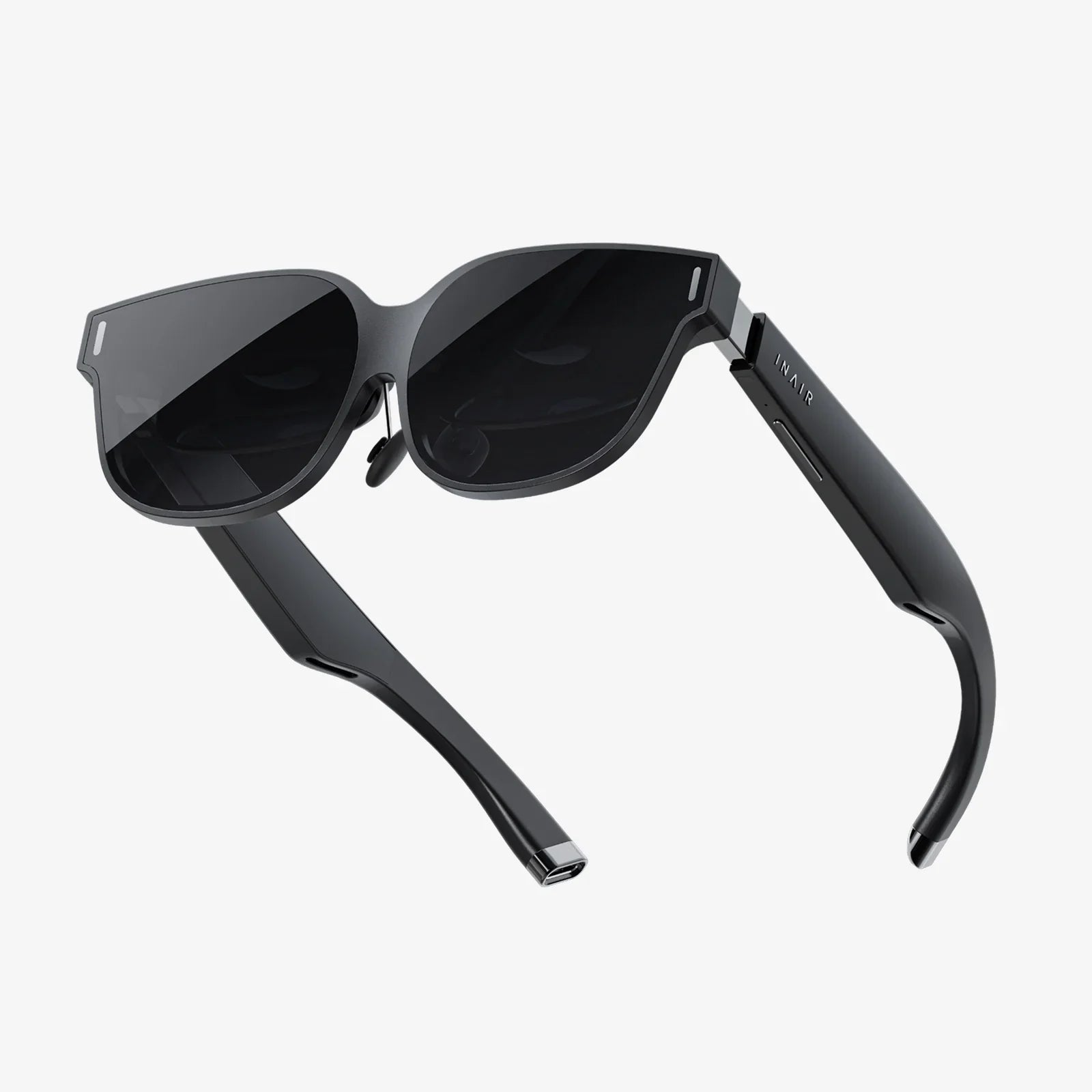
vr glasses for gamming are no longer a futuristic fantasy; they are the fastest way to turn your room into a racing cockpit, a fantasy battlefield, or a creative studio. Yet for many players, the first purchase ends in frustration: motion sickness, blurry visuals, awkward straps, or a library full of games that do not match their tastes. If you are trying to figure out which headset is worth your money, and how to avoid an expensive mistake, this guide will walk you through every critical choice in clear, practical terms.
Before you even compare models, it helps to understand what vr glasses for gamming actually do. At their core, they place two small screens in front of your eyes, one for each eye, and use lenses and sensors to create a 3D world that responds to your head and hand movements. That means the quality of your experience depends on several components working together: the display, the tracking system, the controllers, the fit on your head, and the device that powers the graphics, whether that is a gaming PC, a console, or the headset itself.
Why vr glasses for gamming Feel Different From Regular Gaming
Traditional games keep you outside the world, looking through a window. vr glasses for gamming pull you inside that world. When you turn your head, the virtual environment moves exactly as it would in real life. When you reach out your hand, you see a virtual hand or tool move in the same way. This sense of presence is what makes virtual reality so compelling, but it also raises the bar for hardware and comfort.
Presence depends on three main factors: low latency, accurate tracking, and convincing visuals. If the image lags behind your head movement, your brain notices the mismatch and you may feel dizzy. If the tracking is inaccurate, your aim will feel off and immersion will break. If the visuals are blurry or grainy, you will constantly be aware that you are wearing a device instead of visiting a believable world. Understanding how each specification affects these factors will help you choose vr glasses for gamming that truly feel immersive.
Types of vr glasses for gamming Setups
Not all vr glasses for gamming work the same way. The type of setup you choose will shape your budget, your comfort, and the kinds of games you can play.
PC-based vr glasses for gamming
PC-based headsets connect to a gaming computer through a cable or, in some advanced setups, wirelessly. The main advantages are:
- High visual quality: A powerful graphics card can push higher resolutions, better textures, and more complex environments.
- Large game libraries: PC platforms typically offer a wide range of simulation, racing, flight, and experimental titles.
- Modding potential: Many PC games support mods, custom maps, or user-created content.
The downsides include the cost of a strong PC, managing cables, and more complex setup. If you already own a capable gaming computer, PC-based vr glasses for gamming can be one of the most flexible options.
Console-based vr glasses for gamming
Console headsets connect to a game console and are designed to be more plug-and-play. Their strengths are:
- Simplified setup: You usually connect a few cables, follow on-screen instructions, and start playing.
- Optimized performance: Games are tuned for a single set of hardware, which can reduce compatibility issues.
- Curated libraries: You often get a focused selection of high-quality titles.
The trade-offs are less flexibility compared to PC and dependence on the console ecosystem. If you mainly game on a console and value ease of use, this type of vr glasses for gamming can be very appealing.
Standalone vr glasses for gamming
Standalone headsets have their own processors, storage, and battery. They do not require a PC or console to run games. Their main benefits:
- Maximum convenience: No external hardware needed, just put them on and play.
- Portability: Easy to bring to friends’ houses or different rooms.
- Wireless freedom: No main cable tethering you to a machine.
However, standalone vr glasses for gamming are limited by mobile-class processors, which means simpler graphics compared to high-end PC setups. Some models can connect to a PC for more demanding games, but that adds complexity. If you want quick, casual VR sessions and minimal setup, standalone devices are extremely attractive.
Key Display Specs That Matter for vr glasses for gamming
The display is where many buyers focus first, and for good reason. The right specs can dramatically improve clarity and comfort.
Resolution and screen-door effect
Resolution determines how sharp the image appears. Higher resolution means more pixels per eye, which reduces the visible gaps between pixels, often called the screen-door effect. When evaluating vr glasses for gamming:
- Look for the per-eye resolution, not just the total combined resolution.
- Higher resolution is especially important for reading text, spotting distant enemies, and enjoying detailed environments.
- Remember that higher resolution demands more processing power; ensure your PC or console can handle it.
Refresh rate and motion smoothness
Refresh rate is measured in hertz (Hz) and indicates how many times per second the image updates. For vr glasses for gamming:
- At least 72 Hz is typically needed for comfortable gameplay.
- 90 Hz or higher is preferable for fast-paced action and reduced motion sickness.
- Some headsets support multiple refresh modes; higher rates often require more graphics power.
A smoother refresh rate helps your brain accept the virtual world as stable and reduces the risk of discomfort during quick head movements.
Field of view (FOV)
Field of view describes how wide the virtual world appears in your vision. A larger FOV feels more natural and less like looking through binoculars. When comparing vr glasses for gamming:
- Values around 90 to 110 degrees are common.
- Some high-end models may offer wider FOVs, which enhance presence but can be more demanding to render.
- Perceived FOV also depends on how close the lenses are to your eyes and how well the headset fits.
Lens types and clarity
Most modern vr glasses for gamming use either Fresnel lenses or newer lens designs. The lens type affects clarity, glare, and sweet spot size:
- Fresnel lenses can be lightweight but sometimes produce visible rings or glare around bright objects.
- Newer lens designs aim to reduce distortions and expand the clear viewing area, making it easier to keep the image sharp even when your eyes move.
- Regardless of lens type, proper adjustment of lens spacing (IPD) is crucial for clarity and comfort.
Tracking and Controllers for vr glasses for gamming
Tracking determines how accurately the system follows your head and hand movements. Good tracking is essential for aiming, grabbing, and interacting naturally.
Inside-out vs. outside-in tracking
There are two main tracking approaches in vr glasses for gamming:
- Inside-out tracking: Cameras on the headset watch the environment and your controllers. This setup is easier to use and more portable, with no external sensors to place.
- Outside-in tracking: External sensors or base stations track your headset and controllers. This can offer very precise tracking but requires more setup and a dedicated play area.
For most players, inside-out tracking is sufficient and far more convenient. Competitive users or simulation enthusiasts may prefer the precision of outside-in systems if they are willing to handle the extra installation.
Controller design and input options
Controllers are your hands in VR, so their design matters. When evaluating controllers for vr glasses for gamming, consider:
- Ergonomics: Controllers should feel natural to hold for long sessions.
- Button layout: Important controls like triggers, grip buttons, and thumbsticks should be easy to reach without stretching.
- Tracking coverage: Controllers should remain tracked even when close to your face or behind your head as much as possible.
- Haptics: Vibration feedback improves immersion when firing weapons, grabbing objects, or taking hits.
Some vr glasses for gamming also support experimental hand tracking, allowing you to use your bare hands for simple interactions. While not yet a full replacement for controllers in most games, it can be useful for casual or social experiences.
Comfort: The Most Underrated Factor in vr glasses for gamming
Amazing graphics do not matter if you can only tolerate your headset for fifteen minutes. Comfort is what determines whether you actually use your vr glasses for gamming regularly or let them gather dust.
Weight and balance
Heavier headsets can strain your neck, especially if the weight is front-loaded. Look for:
- Reasonable overall weight: Lighter is generally better, but balance is just as important.
- Good weight distribution: Headsets that balance weight between the front and back of your head feel more comfortable.
Strap design and padding
Straps keep the headset stable without crushing your face. Common designs for vr glasses for gamming include simple fabric straps, rigid halo bands, and hybrid systems. Consider:
- Adjustability: Straps should adjust easily to different head sizes.
- Padding quality: Soft, breathable padding reduces pressure points and sweat buildup.
- Stability: The headset should not shift during quick movements or intense gameplay.
Glasses compatibility and IPD adjustment
If you wear prescription glasses, check whether your chosen vr glasses for gamming can comfortably fit over them or support prescription inserts. Also look for IPD adjustment:
- IPD (Interpupillary distance) is the distance between your pupils. Matching the lens spacing to your IPD keeps the image sharp and reduces eye strain.
- Some headsets offer continuous adjustment, while others have fixed steps or no hardware adjustment at all.
Performance Requirements and Optimization
Even the best vr glasses for gamming will disappoint if the hardware driving them is too weak. Smooth performance is vital for comfort and immersion.
PC requirements for VR
If you choose a PC-based headset or plan to link a standalone headset to a computer, pay attention to:
- Graphics card: VR demands more from a GPU than standard gaming because it renders two views at high frame rates.
- Processor: A modern multi-core CPU helps maintain consistent performance.
- Memory: At least 16 GB of RAM is a good target for smooth VR gaming.
Most headset manufacturers publish recommended system specifications. Treat these recommendations as a baseline, not a luxury.
Console and standalone performance considerations
With consoles and standalone vr glasses for gamming, you do not control the internal hardware, but you can still optimize your experience by:
- Keeping your play area clear to avoid tracking issues.
- Ensuring the headset firmware and games are updated.
- Managing storage so you have room for updates and new titles.
Content Libraries and Game Types
The best headset for you is the one that runs the games you actually want to play. Different platforms emphasize different genres, so think about your preferences before buying vr glasses for gamming.
Action and shooters
First-person shooters and action games are some of the most popular VR experiences. Look for:
- Accurate tracking so your aim feels natural.
- Comfort settings like teleport movement or snap turning if you are prone to motion sickness.
- Multiplayer options if you enjoy competitive or cooperative play.
Simulation and racing
Racing sims, flight sims, and driving games shine in VR. For these, vr glasses for gamming benefit from:
- High resolution to read dashboards and see distant track details.
- Stable tracking for subtle head movements when checking mirrors or instruments.
- Accessory compatibility with wheels, pedals, or flight sticks if you plan a full cockpit setup.
Fitness and rhythm games
Many players use vr glasses for gamming as a way to stay active. Fitness and rhythm titles emphasize:
- Wireless freedom to move without worrying about cables.
- Secure fit so the headset does not slip when you sweat.
- Durable controllers that can handle frequent swings and quick motions.
Social and creative experiences
Beyond traditional games, VR offers social hangouts, creative tools, and educational experiences. If you value these, look for:
- Voice chat and avatar customization for social platforms.
- Precise controller tracking for drawing, sculpting, or building.
- Cross-platform support if you want to meet friends using different devices.
Reducing Motion Sickness with vr glasses for gamming
Motion sickness is one of the biggest concerns for new VR users. While some sensitivity is natural, you can minimize the problem with the right choices and habits.
Choose comfort-focused games
Not all games feel the same in VR. To ease into vr glasses for gamming:
- Start with standing or room-scale experiences where you move physically instead of using a joystick.
- Look for games with teleportation movement or snap turning, which are easier on the inner ear.
- Avoid fast roller-coaster style rides or intense first-person movement until you build tolerance.
Optimize your settings
Small tweaks can make a big difference:
- Increase refresh rate if your hardware supports it.
- Enable comfort vignettes, which darken the edges of your vision during movement.
- Keep brightness at a comfortable level to reduce eye strain.
Adopt healthy VR habits
When using vr glasses for gamming, listen to your body:
- Take short breaks every 20 to 30 minutes, especially when starting out.
- Stop playing if you feel nausea, dizziness, or headaches; pushing through can make symptoms worse.
- Gradually increase session length as you adapt to the sensation of VR.
Setting Up Your Play Area Safely
Immersion is great until you punch a wall or knock over a lamp. A safe play area is essential for enjoyable vr glasses for gamming sessions.
Defining your boundaries
Most headsets allow you to draw a virtual boundary. When you get close to it, a grid or warning appears. To set this up effectively:
- Clear the floor of cables, small tables, and clutter.
- Leave enough space for arm swings and sidesteps.
- Avoid low-hanging fixtures or ceiling fans where possible.
Managing cables and accessories
If your vr glasses for gamming use a cable, route it behind you and consider:
- Using ceiling pulleys or hooks to keep the cable off the floor.
- Wearing the cable over your shoulder to reduce tangles.
- Keeping pets and small children out of the play area while you are immersed.
Maintenance and Care for vr glasses for gamming
Proper care extends the life of your headset and keeps every session clear and comfortable.
Cleaning the lenses
Lenses are delicate and can scratch easily. To maintain them:
- Use a microfiber cloth specifically designed for optics.
- Avoid paper towels, shirts, or abrasive materials.
- If needed, apply a small amount of lens-safe cleaning solution to the cloth, not directly onto the lenses.
Hygiene and sweat management
VR can be physically demanding, and sweat will inevitably reach the headset. For hygienic vr glasses for gamming:
- Consider removable or wipeable face gaskets that you can clean between sessions.
- Let the headset air out after intense use.
- If sharing the device, use disposable covers or sanitize between users.
Storage and protection
When not in use, protect your vr glasses for gamming by:
- Keeping them out of direct sunlight, which can damage lenses and screens.
- Storing them in a case or on a stable stand.
- Avoiding extreme temperatures and humidity.
Budgeting for vr glasses for gamming
VR can fit a range of budgets, but it is easy to overspend on features you do not need or underspend and end up disappointed.
Entry-level budgets
If you are just testing the waters:
- Standalone vr glasses for gamming often offer the lowest total cost of ownership.
- Look for bundles that include a few starter games.
- Focus on comfort and ease of use over bleeding-edge specs.
Mid-range budgets
For players who want more depth:
- Consider headsets that can work both standalone and with a PC.
- Invest in a comfortable head strap and quality audio.
- Balance resolution and refresh rate with what your hardware can realistically support.
High-end budgets
If you want premium vr glasses for gamming:
- Prioritize high resolution, wide field of view, and robust tracking.
- Pair the headset with a strong gaming PC for maximum visual fidelity.
- Consider accessories such as advanced controllers, haptic devices, and cockpit rigs for simulations.
Future Trends in vr glasses for gamming
The VR landscape is evolving quickly, and upcoming developments can influence your buying decision if you are not in a rush.
Better optics and displays
Manufacturers are working on thinner lenses, higher pixel densities, and improved color reproduction. This will mean:
- Sharper images with less glare and distortion.
- Lighter headsets that are easier to wear for long periods.
- More natural-looking worlds that feel closer to reality.
Improved hand tracking and haptics
Future vr glasses for gamming are likely to offer:
- More reliable hand tracking for controller-free interaction.
- Advanced haptic feedback that simulates textures, impacts, and resistance.
- Accessories that let you feel virtual objects more convincingly.
Mixed reality and passthrough experiences
Many headsets already include cameras that show your real environment. As this technology improves:
- Mixed reality games will blend real and virtual objects in your room.
- Productivity apps may let you use virtual screens anchored to your physical desk.
- Safety and comfort could improve as you quickly peek into the real world without removing your headset.
How to Choose vr glasses for gamming That Match You
Instead of chasing the most expensive headset, focus on matching features to your habits and hardware. Ask yourself:
- Where will I use VR most? A small apartment, a dedicated room, or on the go?
- What do I play now? Fast shooters, simulations, casual party games, or fitness titles?
- What hardware do I already own? A gaming PC, a console, or nothing beyond a basic laptop?
- How sensitive am I to motion sickness? Have I felt ill in 3D movies or motion rides before?
Your answers will point you toward either PC, console, or standalone vr glasses for gamming, and help you decide how much to prioritize resolution, refresh rate, and portability.
When you finally slip on vr glasses for gamming that fit well, track smoothly, and run the kinds of games you actually love, the difference is immediate: your room fades away, your hands become tools or weapons or paintbrushes, and every head turn reveals a world that feels surprisingly real. That transformation does not require luck; it requires understanding what matters, matching a headset to your hardware and habits, and respecting your comfort as much as your desire for cutting-edge specs. Take the time to choose carefully now, and your next gaming upgrade will not just be an incremental step forward on a flat screen, but a leap into spaces you can walk through, fight in, and remember long after you take the headset off.
Share:
ameristar screen and glass Solutions for Modern Homes and Businesses
i am cat vr 3d models: How Feline Avatars Are Changing Virtual Worlds